
How to Draw a Rectangle with ActionScript 3.0
by Bandicoot Marketing on | Posted in Tutorials | 2 comments
I spent the last weekend working on a Flash animation for a client and I came across a few things that gave me a headache and other things that I thought I should share with the world that I thought were just intereting.
If you have ever messed around with ActionScript in Flash then you understand just how powerful scripting in Flash could be. I know they just released CS4 but the ActionScript version it uses is still 3.0, so whether you are using CS3 or CS4 this will still work for you.
Sure drawing a rectangle is no big feat but there are a few little things that make it a little bit complicated when trying to draw one entirely in ActionScript.
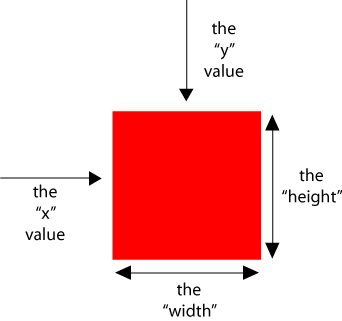
The following code is how you were draw a rectangle as a Shape object. It would also be the same if you were drawing it as a MovieClip.
var rectangle:Shape = new Shape; // initializing the variable named rectangle
rectangle.graphics.beginFill(0xFF0000); // choosing the colour for the fill, here it is red
rectangle.graphics.drawRect(0, 0, 100,100); // (x spacing, y spacing, width, height)
rectangle.graphics.endFill(); // not always needed but I like to put it in to end the fill
addChild(rectangle); // adds the rectangle to the stage
2 comments for “How to Draw a Rectangle with ActionScript 3.0”