
How to Modify Your WordPress <title> Tag for Search Engine Optimization
by c.bavota | Posted in Tutorials | 78 comments
Search engine optimization is one of the more important things, if not the most important, when it comes to your website. Sure, the way it looks and work are both important, as well as the content, but if Google or Yahoo can’t index your pages properly due to the fact that your site isn’t optimized then all that work is for nothing.
There are a few plugins available for WordPress that help with search engine optimization but I’ve found that they don’t allow you to really control all the elements you would want to plus I prefer to hard code certain things, just in case the plugins don’t work with updated versions of WordPress.
The following is a very simple change to perform, but in my opinion, is extremely important for every WordPress install.
Setting up your <title> tag to work dynamically
Whenever you create a web page, you must give that page a name. That is what appears at the top of your browser window.

In the header.php file of your WordPress theme you will come across a bit of code that looks something like this.
<title><?php bloginfo('name'); ?> <?php if ( is_single() ) { ?> » Blog Archive <?php } ?> <?php wp_title(); ?></title>
What this piece of code does is grab the name of your blog and use it for the title of your web page. You control this info by going to your wp-admin panel => Settings => General.
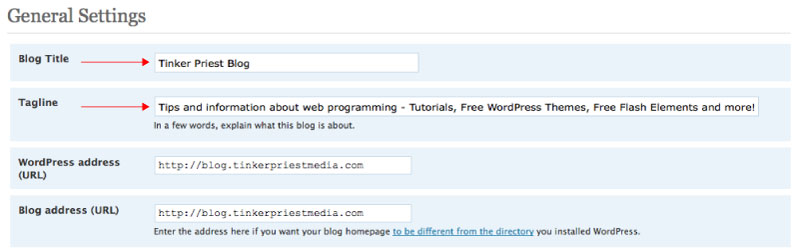
If you are on the main page of your website, you will see the name of the blog at the top of the browser but if you are on on a post’s page then you will see your blog name, “Blog Archive” and then the title of the post.
The basic problem with this default code is that the name of your blog always comes first. Is the name of your blog the most important information or is it the name of your post? Hopefully you said the name of your post.
So, the solution is pretty simple. Let move some things around until we get something like this.
<title><?php if(is_home()) { echo bloginfo("name"); echo " | "; echo bloginfo("description"); } else { echo wp_title(" | ", false, right); echo bloginfo("name"); } ?></title>
The first thing we’re doing here is checking to see if it is the home page. If it is then we’re going to show the blog name and then the tag line (see image above on where to go to change this), separated by a ” | ” character. You can change this to whatever you want but remember to leave the blank spaces before and after the character you choose. Next, if it is not the home page, we are going to show the name of the post (wp_title), but only if there is one. That is what the false parameter is gonna check for us. If there isn’t one then it will just show the blog name. But if there is one then it will show the post name then the blog name, separated once again by a ” | ” character.
Check back for more search engine optimization tutorials and tips.
You can get more information on the WordPress tags used here by going to the WordPress Codex page.


Thank you for this information.
Really a great plugin. I have used some similar ones in the past but this one is the best.
your blog is great thanks for the info
This is a very smart way. Sometimes plugin doesn’t do what it is suppose to be doing, it creates duplicates which confuses you even more. Thanks for the great info.
Amazing information and Pleasure to read this.
Thanks great post.
Thanks very much for the great information. I’m new to writing any sort of code, and had been looking for a way to have my site’s homepage and other pages display diferent title text. Been able to do that now thanks to your instructions, and my title bars look much more professional now as well as displaying how I want them to. Cheers!
Wayne
This is useful tutorial to change wordpress title or you can following url below to know how to modifying it
http://codex.wordpress.org/Template_Tags/wp_title
Right on the spot. I tried to use All in One Seo and even Platinum SEO to do the work but it aint easy. Your post solved it all. Thanks.
I am using the All in Once SEO Pack..hmmm, I think I’ll give this one a try…Thanks for sharing the info
And keep up the good work here on your blog and remember that success is not by chance, it is by CHOICE!
Cheers,
Vanessa
Love your writing style and the design of your blog, its very original! Well done, look forward to reading more.
Thanks for this WordPress tutorial. I am so glad I found it. It is easy to understand and fun to read.
If you see here in blow header.php code. When i open any single post it shows me on top “Single post | Blog name” but just want “Single post” on top nothing else. What should i do?
here is a few lines from header.php:
<?php if (ishome () ) { bloginfo(‘name’); }
elseif ( iscategory() ) { singlecattitle(); echo ‘ – ‘ ; bloginfo(‚Äòname‚Äô); }
elseif (issingle() ) { singleposttitle();}
elseif (ispage() ) { singleposttitle();}
else { wp_title(‘’,true); } ?>
What a great site for info, I am a novice, The info gained here I can put in my log and reuse in time.Thank youOur site please check us out
This is a custom theme I have designed. My RSS button is directly underneath the big red “B” in the top left.
After reading the article, I feel that I need more information on the topic. Could you suggest some more resources ?
p.s. Year One is already on the Internet and you can watch it for free.
I was searching for a modification tutorial, thanks for keeping it simple for an old guy like me!
If your main keyword is in the name of your company or business and it is included in the title tag, if you the register your site with Google Local Business Center you are likely to find you rank better for your keywords.
We offer high quality lady’s and men’s handbags. Free shipping for all. More then 30% discount. 40% cheaper then the market. But we made the best goods. Welcome to our website!
Great idea, but will this work over the long run?
Love it. I didn’t want the title of my site on article post pages. So I removed echo bloginfo(‘name’);
Thanks!
Thank you. This is exactly what I was looking for
Hi! I was searching similar to your tutorial and stumbled with your site. Nice detailed information you have put in there. Thanks for sharing your knowledge.
I could use this on my newest blog oes tsetnoc
Great info. I totally agree that the title of a particular post is most important. You taught me something new. Thanks