
How to Modify Your WordPress <title> Tag for Search Engine Optimization
Search engine optimization is one of the more important things, if not the most important, when it comes to your website. Sure, the way it looks and work are both important, as well as the content, but if Google or Yahoo can’t index your pages properly due to the fact that your site isn’t optimized then all that work is for nothing.
There are a few plugins available for WordPress that help with search engine optimization but I’ve found that they don’t allow you to really control all the elements you would want to plus I prefer to hard code certain things, just in case the plugins don’t work with updated versions of WordPress.
The following is a very simple change to perform, but in my opinion, is extremely important for every WordPress install.
Setting up your <title> tag to work dynamically
Whenever you create a web page, you must give that page a name. That is what appears at the top of your browser window.

In the header.php file of your WordPress theme you will come across a bit of code that looks something like this.
<title><?php bloginfo('name'); ?> <?php if ( is_single() ) { ?> » Blog Archive <?php } ?> <?php wp_title(); ?></title> |
What this piece of code does is grab the name of your blog and use it for the title of your web page. You control this info by going to your wp-admin panel => Settings => General.
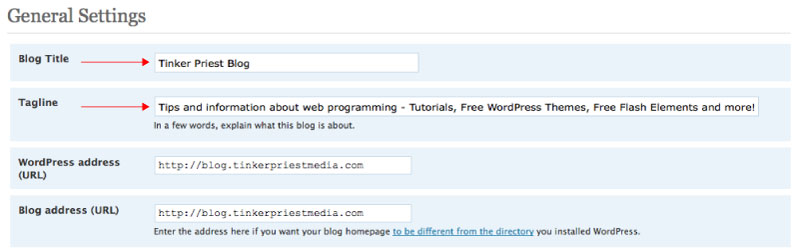
If you are on the main page of your website, you will see the name of the blog at the top of the browser but if you are on on a post’s page then you will see your blog name, “Blog Archive” and then the title of the post.
The basic problem with this default code is that the name of your blog always comes first. Is the name of your blog the most important information or is it the name of your post? Hopefully you said the name of your post.
So, the solution is pretty simple. Let move some things around until we get something like this.
<title><?php if(is_home()) { echo bloginfo(‘name’); echo ‘ | ‘; echo bloginfo(‘description’); } else { echo wp_title(‘ | ‘, false, right); echo bloginfo(‘name’); } ?></title> |
The first thing we’re doing here is checking to see if it is the home page. If it is then we’re going to show the blog name and then the tag line (see image above on where to go to change this), separated by a ” | ” character. You can change this to whatever you want but remember to leave the blank spaces before and after the character you choose. Next, if it is not the home page, we are going to show the name of the post (wp_title), but only if there is one. That is what the false parameter is gonna check for us. If there isn’t one then it will just show the blog name. But if there is one then it will show the post name then the blog name, separated once again by a ” | ” character.
Check back for more search engine optimization tutorials and tips.
You can get more information on the WordPress tags used here by going to the WordPress Codex page.


Hello folks, yes, this is quite good for seo persons and I agree with the above points. Thank you for this information.
im just a beginner in Search Engine Optimization and i am still doing quite a lot of research about basic SEO.
very nice post
I have a question for you
can it works in all kind of theme?
im a newbie in Search Engine Optimization and i still need to study more on internal linking. Currently, what i do to optimize my website is just make as many backlinks as possible.
See what the major web 2.0 sites (Twitter,Facebook etc) are linking up with and try to get a link with those sites.
I like all points you share here. Do open source projects using the same tactic? Their products are completely free but they can still make most out of them and even become rich. For instance, Firefox earn millions last year although it doesn?t require users to buy.
Open Source Projects earn revenue differently. End users or customers do not pay most of the time. Its advertising mostly or the service charges they bank upon. Consider major search engines (Google/Yahoo/MSN), their products are open source in the sense that it is freely for people to use but their earnings come through advertising.
Earnings for open source programming languages like Python or ERP packages like ERP5 come through services/technical issues they resolve for those who have installed/downloaded/used their product.
This was very useful for me as I am just starting to learn php basics and it was very hard for me to find how to do this myself.
I am using Jeff Johnson’s new SEO plugin. Thats really great, its an all in one plugin with lot of features. . .
Thank your for this useful post for a newbie
Very useful information. But I think there are plugins available, which can do the trick.
For wordpress there is a plugin called “All in One SEO Pack” which is a great tool to customize your page/post titles, meta description and for keywords.
Awesome stuff. I used to have to try and do this all the time but wordpress developers are smart. I’m happy with the All In One SEO pack. I actually don’t even bother with it on most stuff because I title posts well. However, when I want to switch it up there is never a problem using the pluggin.
Title plays a vital role in site optimization & it is absolutely necessary to have titles for every contents of your site so that it can be indexed quickly by search engine quickly.
Thanks for the great info, i was looking for something similar as we all know how important is to put right title according to the post. As google give more importance to the title.
Sorry CirckrtVillage but i have to disagree with you on the “google give more importance to the title”
unfortunately most people still belive the myths of the ’05-’07 era where google place more weight on the “Keyword Density”,”Titls”…etc but this has been proven to be not true to some extend…ofcourse they still have some weight on google but not as much as it was few years ago.
The thing about titles is that every search engine uses them to index your page. So if your title is “Using WordPress” or “Using WordPress to Develop Your First Blog”, someone who is skimming a search results page might find the later more useful and click on it first, giving that page more hits and possibly, in the end, more backlinks.
Being more precise with your page title and having a function in place to dynamically change it on every page is a step in the right direction when it comes to SEO.
if there isn’t availabe a plugin for the cms (as WP for instance), we should have the query before loading the page. we can take first 6 – 10 words from the title and display it within the title tag. the same story with description, which can be taken from the main area of the content. this is a simple working and fully functional dynamic title and description. the title can be appended to url, after having inserted “-” char between words and stripped them of illegal chars.
The quotation marks are messed up with the example code…its easier just to use all vertical ones.
Aside from that its working great thanks
Fixed. Thanks.
Great post, very useful information,particularly for a wordpress novice. Just installed the plugin and its so easy to use. Thanks!
i am a newbie in Search Engine Optimization but i think that the submission of articles in article directories is one of the best ways to gain backlinks. :
Thank You – this is exactly what I needed!
Great info! Exactly what i was looking for! I was getting quite annoyed with seeing my pages turn up in google with ‘blog archive’ in the title.
Am I missing something here – I though all-in-one SEO allowed you to do this without all that tedious mucking about in hyperspace.. er sorry, in php
There are plugins that do this but if you are building a premium theme or something like that, it makes sense to include the above code since you never know what plugins someone might use.
Thanks for this mate! Also guys, also don’t forget to do the same with the permalinks in the URL > if not homepage, I would suggest this:
/%postname%/%category%/
Always remember, relevance starts left and loses value to the right
Any good but inexpensive seo software out there ?.~”
Great Post! This helped me get my titles straight at http://dennisboard.com. I was struggling with just having a simple title before I found this.
Thanks a lot, i’m not looking for the title tag but it makes me understand on how to call the title text on each pages to optimize on page seo
Very useful post, thanks.
Is there a way to add extra words to your homepage title that are not found in ‘blog title’ or ‘blog tagline’ fields?
Sure. Just add the plain text between your title tags.