
Oct
28
2008

Two Things You Should Do After Installing WordPress

by   |  Posted in Tutorials  |  14 comments

WordPress is a great tool whether you want to install a basic blog or use it as a content management system. Programmers can very easily go in and manipulate the code to get it to do anything they please. Plus there are tons of great plugins available to add every single feature you can imagine.

Whenever I work with WordPress, there are a few things I do immediately after a new install. They help with search engine optimization and making things work a little better.

1. Activate pretty-permalinks

When you first install WordPress, the permalinks default to something that looks like this,
http://bavotasan.com/?p=123
But we want it to look like this
http://bavotasan.com/tutorials/things-you-should-do-after-installing-wordpress
Why? Because that is the first step to optimization your new WordPress install for search engine ranking.

How do you do it?

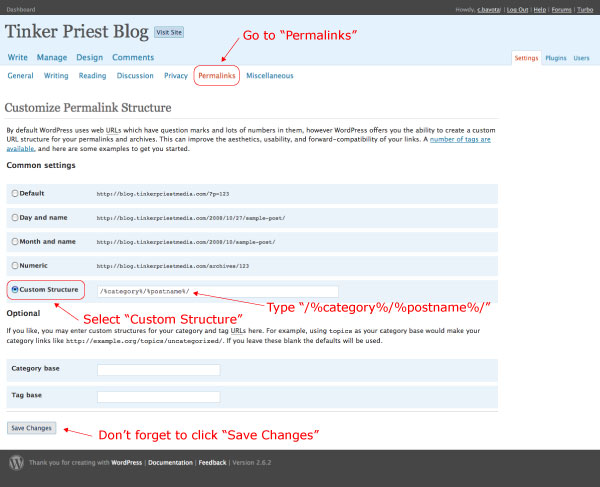
1. After logging in to you wp-admin, click “Permalinks” under the “Settings” menu on the left
2. Select “Custom Structure”
3. Type “/%category%/%postname%/
4. Click “Save Changes”
2. Make sure thumbnails do not crop to exact dimensions.

When you upload an image to WordPress, the default setting crops the thumbnail to be exactly 150px by 150px. Not too good if the images you are uploading are not perfectly square. (If by chance you do want your images to be cropped to these exact dimensions then you can ignore this one.)

How do you do it?

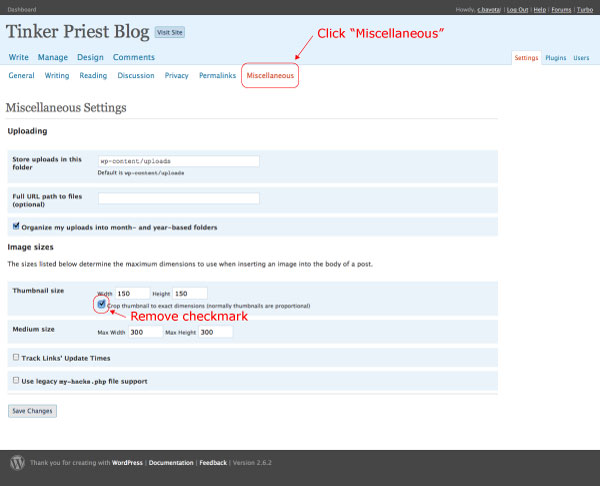
1. After logging in to you wp-admin, click “Media” under the “Settings” menu on the left
2. Click the checkbox under “Thumbnail size” that says “Crop thumbnail to exact dimensions (normally thumbnails are proportional)” to remove the check.
3. Click “Save changes”
Even though these are two little things, I find that they are both very important to start things off on the right foot with a new WordPress install.

About the author:

A freelance web developer living in Montreal who spends most of his time writing for this site and building Premium themes for WordPress. You can find him on Twitter @bavotasan.

Site5 Affiliate Link
If you liked this, please share it.

Tags: , , , , , , , , , , , , , , , ,

Short URL: http://bit.ly/btCDJ7

Discussion 14 Comments

  1. ashley on February 14, 2009 at 12:22 am

    For WordPress 2.7, you can find it in “Media Settings”.

  2. Lillian on May 22, 2009 at 1:17 am

    Thank you so much, I love this blog, you make things so easy! You’re the best :-)

  3. Gary B. Garagnon on June 2, 2009 at 9:26 pm

    Also you can make your images more search engine friendly by giving each image a title relating to your post.

  4. Calandra on June 19, 2009 at 6:36 pm

    Me again, I’m using your cool magazine theme on two different sites. The permalink works fine at http://iepressurewash.com/, but when I use it at sewcraftful.com the site breaks up.

  5. Alex on October 23, 2009 at 11:52 am

    I will modify as suggested. Your blog and themes always great! Thank you!

  6. Sniffer on October 30, 2010 at 10:35 am

    This is pretty cool.

    The only problem is when some post has two or more categories, then it will use only the first category for the permalink (first=category with lower ID number).

    For instance, something posted in categories “Art” and “Photography” will have the permalink as:
    http://yoursite.com/art/posttitle/

    The thing, and this is a WP problem, is that there is not how to specify a “main” category.

    In b2evolution you can chosse a main category (which is used in permalinks) and then add as many different categories as you want.

    • Sniffer on November 1, 2010 at 5:32 am

      Correcting myself: after changing permalinks according to your suggestion, I could notice that when making a new post, OVER THE POST TITLE, there’s a field where you can change the category link manually.

    • c.bavota on November 1, 2010 at 9:53 am

      When you set the pretty permalinks, a field will appear that lets you control the post/page slug. You can only modify the slug and not the category.

  7. Amy on December 28, 2010 at 5:00 pm

    Thank you for the reminder to set up pretty permalinks. On a recent new WordPress site, I forgot to change the permalinks, and then I had to go back and change all my url’s which resulted in several lost backlinks.

  8. Aery on January 8, 2011 at 10:46 am

    What if I leave them blank? I dont want thumbnails, WP is duplicating my images :(

  9. Katie Weston on April 23, 2011 at 11:12 am

    Having pretty permalinks is soooo much better, what I don’t get though is why that isn’t the default setting? I mean who wants ?p=329 to be the url of their page? Not me!

    • c.bavota on April 23, 2011 at 12:12 pm

      The problem is that not all servers allow for this type of URL structure. Hence why it’s not the default.

  10. Gerald Moniker on May 5, 2011 at 11:17 am

    Hmm. Permalinks yes, not sure about the cropping. Be careful with this one as you can get a little stung with it.

  11. David Tan on May 20, 2011 at 3:38 pm

    Not sure why crop is checked by default and I agree that it should be unchecked. More examples here http://www.davidtan.org/wordpress-hard-crop-vs-soft-crop-difference-comparison-example/