
Adding a Tweet Button to WordPress
by Bandicoot Marketing on | Posted in Tutorials | 11 comments
 After I completed the redesign for bavotasan.com, I was looking for some social media links to add to the bottom of my single post pages. The main two buttons I wanted were a Facebook Like button and a Tweet This type button. The Facebook Like button was easy to find and install, but it took me a while to find the official Twitter button, since I never really looked at the footer links on Twitter.
If you click on the Goodies link, you will see three options: Tweet Button, Widgets and Buttons. All three are useful, but for my purposes, the Tweet Button was all I needed. You will probably have to sign in to Twitter before you can check out the Goodies.
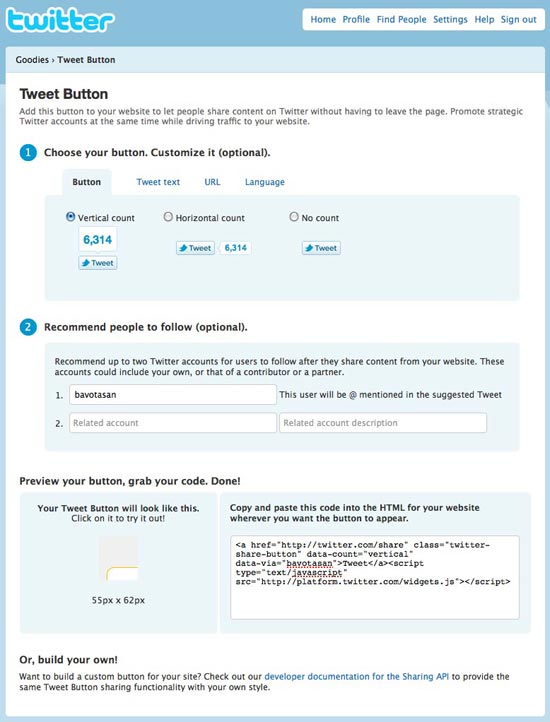
Twitter's Tweet Button options page
There are many options you can tweak to get the Tweet Button working the way you want. I left everything on the defaults and ended up with this bit of code:
<a href="http://twitter.com/share" class="twitter-share-button" data-count="vertical" data-via="your-username">Tweet</a><script type="text/javascript" src="http://platform.twitter.com/widgets.js"></script>
Including this code anywhere in your single.php file will work. If you wanted to include it on a category page or your index page, you would need to make a few changes.
<a href="http://twitter.com/share?url=<?php urlencode(the_permalink()); ?>&counturl=<?php urlencode(the_permalink()); ?>" class="twitter-share-button" data-count="vertical" data-via="your-username">Tweet</a><script type="text/javascript" src="http://platform.twitter.com/widgets.js"></script>
Include that within the loop and it will include the post specific URL for each button. You can even take it one step further if you’re using shortlinks:
<a href="http://twitter.com/share?url=<?php echo urlencode(wp_get_shortlink()); ?>&counturl=<?php urlencode(the_permalink()); ?>" class="twitter-share-button" data-count="vertical" data-via="your-username">Tweet</a><script type="text/javascript" src="http://platform.twitter.com/widgets.js"></script>
The last code snippet is the one I use on this site. You can see the Tweet Button directly below.
11 comments for “Adding a Tweet Button to WordPress”