
Oct
27
2010

Delete Duplicate Posts Pro WordPress Plugin

by   |  Posted in Downloads  |  95 comments

I just updated this plugin for WordPress 3.0. I also simplified the manual cron process. If you have any questions post them in the support forum.

What exactly does this plugin do?

Let’s say, hypothetically, you have a website that gathers news from RSS feeds with some sort of parser. Sometimes, for whatever reason, you might get multiple versions of the same post. Delete Duplicate Posts Pro WordPress plugin to the rescue.

This plugin offers the ability to manually list all dupes and then delete them. Or you can activate a daily WordPress cron to make it happen automatically. Advanced users even have the ability to setup their own cron, for more control.
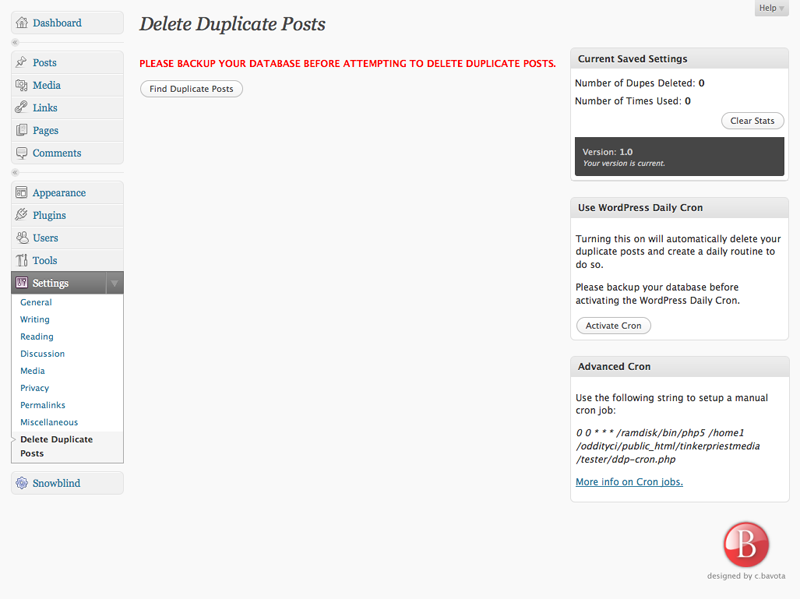
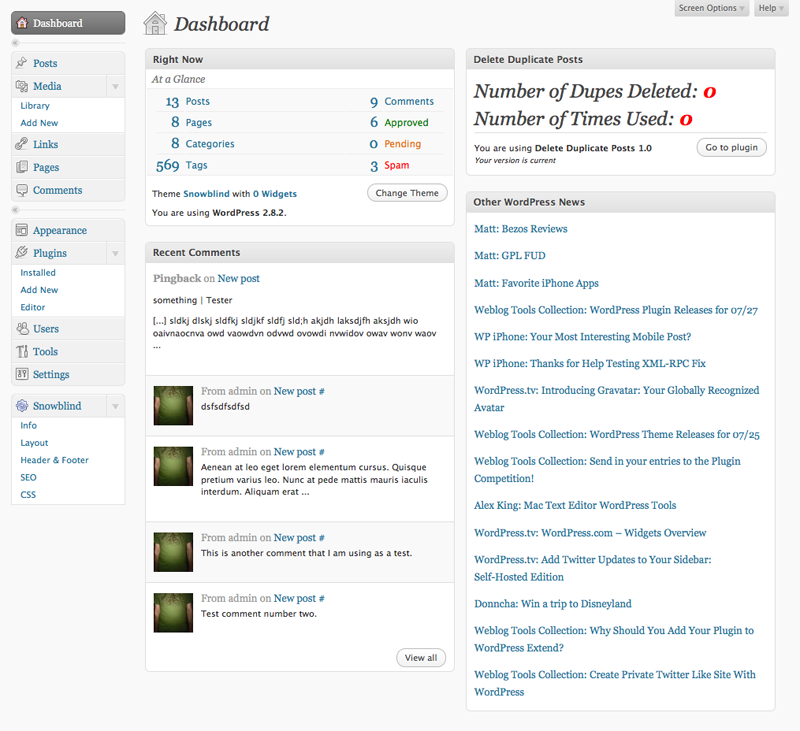
Picture-1Picture-2


This plugin can really help you out if you are using auto-blogging plugins like Wp-O-Matic, FeedWordPress and Autoblogged.

A single site license costs only $19.77 for lifetime use. All updates are yours for free.

Delete Duplicate Posts Pro is designed for WordPress 3.0. It has been tested on older versions and does work but many extra features, like the Dashboard widget, might not function properly.

Click the “Buy” button below to purchase a single site license. Be sure to click back after completing the purchase to download the plugin and get your activation code.

NOTE: You don’t need a PayPal account to make a purchase. Just look near the bottom left after you click the “Buy” button for the “Don’t Have a PayPal account” link. You will not need to create an account, you will just need to enter your CC info.

No refunds available.


Unlimited License Now Available for $49.77!

View Changelog

12/16/2010 v1.0.2
  • Fixed cron job path
10/27/2010 v1.0.1
  • Updated for WordPress 3.0
  • Simplified manual cron
  • Cleaned up code
  • Removed ddp-cron.php file
06/17/2009 v1.0 Public Release

About the author:

A freelance web developer living in Montreal who spends most of his time writing for this site and building Premium themes for WordPress. You can find him on Twitter @bavotasan.

Site5 Affiliate Link
If you liked this, please share it.
If you require help or support, please visit the Support Forum and ask all your questions there. Questions about themes or plugins posted in the comments below will not be answered.

Tags: , , , , , ,

Short URL: http://bit.ly/bCSa1u

Discussion 95 Comments

  1. Celebrything on June 23, 2009 at 8:46 pm

    Anybody have any reviews of this plugin?

    I’m specifically wondering what volume this plugin can handle. Can it go through 50,000 posts and remove duplicates?

    • c.bavota on June 24, 2009 at 10:01 am

      Hey Celebrything,

      I have not tested it on tens of thousands but I have tested it on thousands.

  2. bllogger on July 9, 2009 at 4:50 am

    hi,can i use any demo or trial version or test if applicable ?

    • c.bavota on July 11, 2009 at 4:04 pm

      I don’t offer a trial version. I am here though if you have any questions about the plugin.

  3. Robin Majumdar on July 25, 2009 at 10:19 am

    This sounds interesting although it would be nice to have more information (or better yet, a trial limited to a certain time or number of posts) or screenshots.

    Most specifically, I’m curious what method is used to detect duplicate posts? Does it use an algo that checks for duplicate sentences or phrases within posts and use that as a scoring mechanism? I’m a bit concerned about a tool like this deleting based on false-positive matches.

    Cheers!

    • c.bavota on July 28, 2009 at 10:00 am

      Hey Robin,

      It works using a database comparison of titles and dates. So right now, it will delete the newer posts with the same title. It has been tested on thousands of posts and I have not encountered any problems. Of course, make a backup just in case because anything can happen. I will take some screenshots and post them up. That’s a great suggestion.

  4. r00tman on July 29, 2009 at 4:03 pm

    Hi there,

    Will this find identical posts and delete them? I have many posts that are the same but with -2, -3, -5, ect.. at the title of the post. Please e-mail me and I will send you a link to show you what I mean. Thanks!

  5. thom on July 31, 2009 at 5:46 pm

    Just wanted to say that I’m using this plug-in on a number of blogs, which all bring in their content from syndicated streams of PHPBB forum posts. Though the post duplications themselves are an intermittent mystery, the plug-in solves the problem perfectly. You can set up a nightly chron job, or customize it further if you know your way around that. An excellent tool! Thanks to bavota for helping me work out some kinks…

  6. Liana on August 4, 2009 at 10:51 pm

    I’m a little torn about paying for this plugin when I will only need to run it once. I imported old postings from my Blogger and LiveJournal blogs and now have many duplicates that I need to get rid of. However I have no need to continue to use the program in the future. That makes it tough to want to pay for a one time use.

    This is so frustrating.

    • c.bavota on August 5, 2009 at 11:15 am

      Understandable. If you are familiar with using MySQL there are solutions for you online. This plugin will just save you the time and do it all properly without the chance of messing it up.

  7. Nick Tankersley on August 18, 2009 at 4:56 pm

    Since it is 2.8 ready does that mean it uses the same plugin settings options as WordPress MU?

    Is there a refund procedure if it doesn’t work with an MU setup?

    • c.bavota on August 24, 2009 at 10:49 am

      Hey Nick,

      I have not tested it on MU so I am not too sure if the database is set up the same way. The plugin searches through the wp_posts table and compares posts titles. If MU is setup to work the same as a regular install then it should work the same. Check out your database and see how it is set up.

  8. Vineet on August 21, 2009 at 2:51 am

    Hello…

    I tried to installed that plugin and I got this error “The plugin does not have a valid header”. The plugin is not showing up in my plugin list. I using the latest version of WordPress ie. 2.8.4

    Please Help

    Thank You

    • c.bavota on August 24, 2009 at 10:54 am

      Hey Vineet,

      That error occurs because the zip file was created on a Mac instead of a PC and that screws up the WordPress admin plugin uploader. I have now created the zip files in a PC format so this will no longer occur.

  9. download person on August 22, 2009 at 11:45 pm

    let us download this and try !
    when u go to store u will see the product before you purchase !

    • c.bavota on August 24, 2009 at 10:55 am

      I don’t offer a test version because some people pretty much only need to use this once and that would defeat the purpose of trying to sell it. Sorry.

  10. Internet Outfitter on September 6, 2009 at 7:21 pm

    Do you have an affiliate program for this product. It sounds like a great plugin that can save us bloggers a ton of time and energy.

    Thanks and keep up the great work!
    Mark Hamilton aka “The Internet Outfitter

  11. Andrew on September 7, 2009 at 4:47 pm

    Hi,

    I just purchased your code, and I entered my localhost address as the URL, as I have thousands of duplicates I want to remove. But I enter the validation code and it does not work.

    I guess it doesn’t work this way – so can I have a refund please?

    I Just tried emailing via your contact form, but I doesnt work.

    • c.bavota on September 7, 2009 at 6:08 pm

      Hey Andrew,

      You need to make sure that the URL is the exact URL that appears here in your WordPress admin Settings => General menu page.

  12. Ron Jones on October 16, 2009 at 12:32 pm

    Hello Mister Bavota, sorry, just had to throw that in – lol
    No offense intended, just read on your about page.

    Hey, how the heck would you set up a crontab for this?
    Can you give a specific example(s)?

    I was helping my customer set it up but it seems that the plugin is calling a file that is not in the plugins folder, wp-config.php ?

    wp-content/plugins/wp-config.php) [function.main]: failed to open stream: No such file or directory

    wp-config.php is in the root of the wordpress install.

    Any ideas? , Ron

    • c.bavota on October 21, 2009 at 11:34 am

      Hey Ron,

      Is your WordPress install located somewhere other than the root folder?

    • Ron Jones on October 21, 2009 at 7:20 pm

      No, their site is in the root.
      I think they did use Fantastico to originally install it.

  13. Erich on October 30, 2009 at 10:58 pm

    I purchased this and it works perfectly on wp-o-matic duplicate posts. I spend 2 hours every morning fishing thru dupes. At $19.77 this is the best investment I made. Now I can get 2 hours extra sleep in the morning! Inspite of the tedious dupe hunting I do, this plug in was able to find an additional 2230 dupes I have missed!

  14. Kevin on November 17, 2009 at 1:53 am

    Dos this work with Autoblogged? I have been plagued, recently, with duplicate posts on all my sites, and some only have 1 feed running.

    Thank you,
    Kevin

    • c.bavota on November 17, 2009 at 12:23 pm

      Hey Kevin,

      This plugin will search you database for duplicate post titles. The oldest post will be preserved and the new posts will be deleted. It will work with any autofeeder plugin that creates duplicates with the same post name.

  15. phpbazaar on November 25, 2009 at 12:59 pm

    i have used this tool it deletes the duplicate posts in few earlier i use to do it manually hope you understand how difficult it was!

  16. Barb Baines on December 8, 2009 at 1:23 pm

    I use wp-o-matic for my blogs and want to delete the older posts rather than the new posts since the new post will have more updated info not to mention a chance to be indexed in the search engine if it hadn’t been indexed in the past. Can I do this easily with your plug in? Thanks: ~~Barb

    • c.bavota on December 8, 2009 at 6:09 pm

      I am currently working on this functionality. Check back for updates.

  17. Ron Pitts on December 10, 2009 at 3:21 pm

    Mr Bavota. I too, would rather delete the old dupes than new ones. I have same sentiment as Ms. Baines above. Let us know when this functionality is in place. I have 6 sites I need to have this incorporated on.

  18. Jeff Abernathy on December 15, 2009 at 4:28 pm

    The traditional fixes for dupes on wp-0-matic don’t work on the latest version so this patch will come in vary handy. I have 17 real estate blog sites and I feed MLS data to my blogs. Makes a lot of sense to keep new posts and delete old ones. Property blogs usually come in with the property address as title so if a new one comes in I’d like to keep the new one and discard the old. I’ll wait when you have they new patch you mentioned that will delete the old one instead of new.

  19. Ben on January 14, 2010 at 2:02 pm

    I don’t get it as to why when i use the fetch link for wp-o-matic it works fine but when i try to use the webcron it gets dupes. Can this plugin be set to run immediately after wp-o-matic so my site doesnt show the dupes for very long and also remove them before twitterfeed picks up my feed and tweets it. I don’t want to tweet a bunch of dupes

  20. Topinambour on January 16, 2010 at 6:33 pm

    hi
    your plugin interest me.
    Does it work with draft or only with online post ?

    • Leo Lopez on January 16, 2010 at 9:48 pm

      Why would you have dupes in draft?

  21. eric on January 20, 2010 at 2:11 pm

    Lately this plug in have hung up on my site when I click find duplicate posts. Anybody else have this problem. I updated to WP 2.9. I’ve kept the size of my database relatively the same. I only keep 6 months worth of info at all times.

    When is the new version that deletes older blogs going to come out? Any ETA?

    • eric on January 26, 2010 at 2:34 pm

      Found the solution: Empty Trash.

      Apparently deleted items stay in the trash and is included in the search… that’s why it hangs. It goes thru, it just takes a long time. After emptying trash, it’s back to normal.

      When is the new version that deletes older blogs going to come out? Any ETA?

  22. Clayton on January 20, 2010 at 5:23 pm

    Success!!!!!!!!!!!!!!!!!!!!!!!!!!!!!!!!!!!!!!!!!!!!!!!! that is so much better! Thank you for being the only source on the whole world wide web that has a functional solution for none techies like me! (plus that was skookum fast customer service on my questions!) By the way, I just said good bye to 4000+ posts in every section – drafts, posts, scheduled etc.

  23. Shawn Plep on January 25, 2010 at 10:19 am

    Does this work correctly with WP 2.9.1? I am using a custom feed import plugin and when I import the feed it imports new AND old posts, so I end up with multiple copies of the same post but with different permalinks. I just haven’t seen any explicit comments here as to whether or not it works with the latest version of WP. Thanks.

    • c.bavota on January 25, 2010 at 1:55 pm

      I haven’t had any issues with 2.9.1. All my tests work perfectly.

  24. Joshua on February 3, 2010 at 9:28 pm

    Is there a code to prevent the duplicate post from occurring in the first place? WP 2.5.1

    • c.bavota on February 4, 2010 at 10:59 am

      The problem is the fact that most autofeeders don’t do it right in the first place. Hence all the duplicate posts and the need to be able to delete them.

  25. Factoring on February 22, 2010 at 11:12 am

    Is this working on WP 2.9.x , too?

    • c.bavota on February 22, 2010 at 2:01 pm

      Yup. No issues with 2.9.x.