Jun
19
2010

Feed Me, Seymour 1.2

by   |  Posted in Downloads  |  92 comments

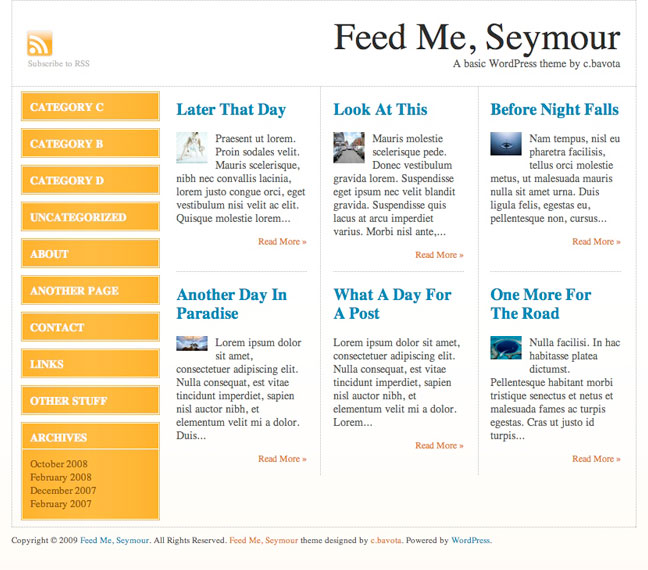
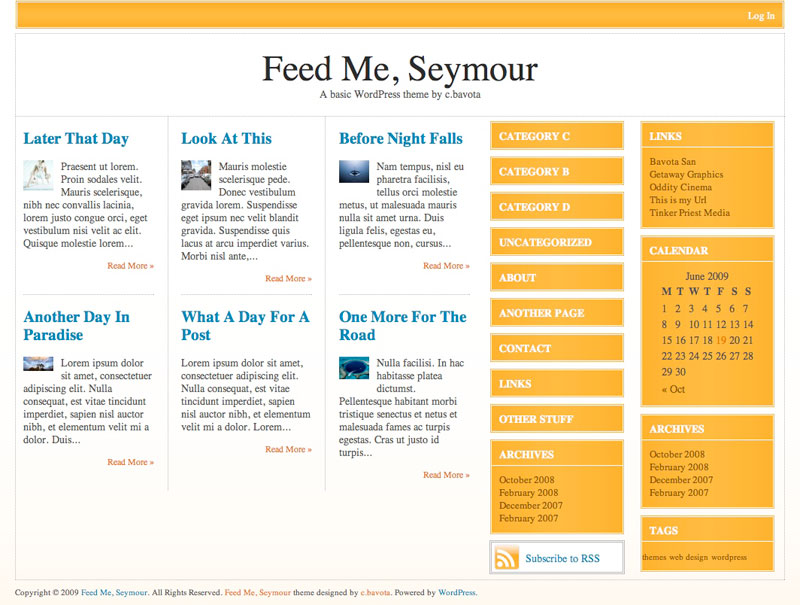
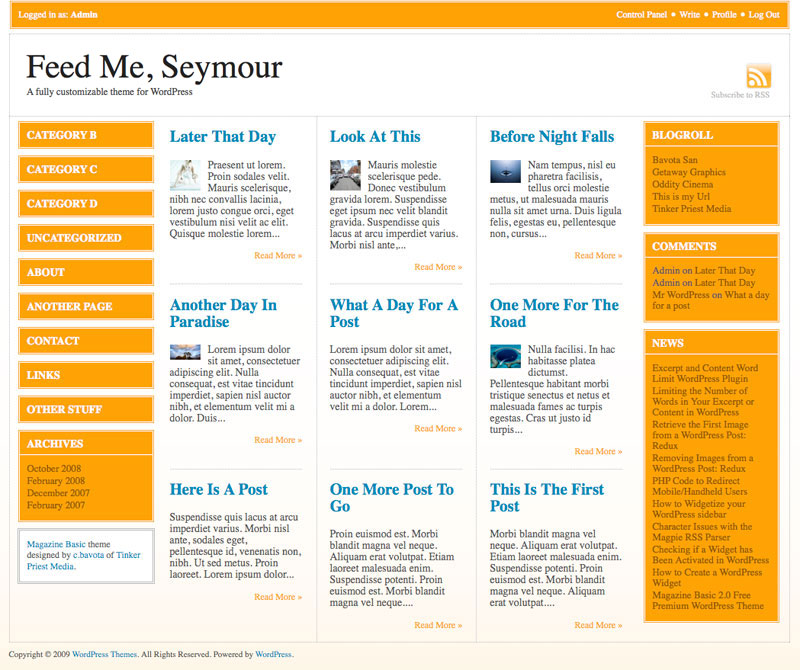
I have just updated Feed Me, Seymour for WordPress 3.0 and many of its new features. I have also cleaned up the code and added the Arturo Theme Engine v2.0 so that the admin interface works a whole lot better. Version 1.2 is currently only available on this site. Just click the download button below.

Here are some examples of different layout options.
feedmeseymourfeedme2feedme3


For more info go to Themes by bavotasan.com.

About the author:

A freelance web developer living in Montreal who spends most of his time writing for this site and building Premium themes for WordPress. You can find him on Twitter @bavotasan.

Site5 Affiliate Link
Share the love...
If you require help or support, please visit the Support Forum and ask all your questions there. Questions about themes or plugins posted in the comments below will not be answered.

Tags: , , , , , , , , , , , , , , , , , ,

Short URL: http://bit.ly/azKzKT

Discussion 92 Comments

  1. c.bavota on June 19, 2009 at 2:25 pm

    Version 1.1 solves a lot of issues. It will be available shortly on WordPress.org.

  2. lucy on June 21, 2009 at 10:28 pm

    i like this theme a lot! version 1.1 isn’t showing up on wordpress.org yet. any idea when that’ll be up?

    thanks!

    l

    • c.bavota on June 23, 2009 at 2:48 pm

      They refused to host it because I have ads now that promote Premium themes.

  3. IntelliQ on June 22, 2009 at 12:28 am

    I’m using your magazine theme, this one is a step above, and dang near perfect.
    I’d only suggest that it have the option layout for “Lastest Story” which takes up one section itself at the top like it does with the magazine theme.
    Perhaps a “feed” option for newbs in the control panel would make it 100% turn-key. so a person can have latest news feeds in the right panel somewhere.
    To get those two things, one needs to learn how to code. (which isnt a bad thing, but many people dont have the inclination or time, hence the reason we check out the premade ones).

    All in all, no real negatives. It’s free and a very nice looking theme. Far and away much better than 99# of the other themes in the free theme community. Many charge for much less.

    Great work.

    • c.bavota on June 23, 2009 at 2:50 pm

      You have an RSS widget in the Appearance menu of your WordPress admin that might do what you are looking for.

  4. lefteris on June 28, 2009 at 2:29 pm

    just a question.
    i use the magazine latest version , how can i change the character size on the title of the posts?

  5. teratips on July 3, 2009 at 6:29 am

    AWESOME theme, THanks

  6. Don on August 28, 2009 at 1:17 am

    First, Feed Me, Seymour is a great theme. It’s been very good to configure and works with a variety of plugins.
    Is there any way to change the theme options for specific pages. We have an amazon associates store that uses an iframe to be displayed and I’d like to have only one sidebar for that page as the store iframe minium size is too big when I use the amazon sidebar.

    main page
    http://www.ojaischoolofmassage.com

    store with amazon sidebar turned off (which means no access to categories)
    http://www.ojaischoolofmassage.com/osom-store/

  7. Marlena on September 4, 2009 at 6:45 pm

    I cant seem to get the header to change. Is there a set pixel size it has to be? A set filename it has to be? It will not load my logo. HELP!!!!

    The page wont even show up now unless I change it back to no header.

  8. Tanner on September 22, 2009 at 11:38 am

    I like and am using Feed Me 1.1

    I am used to being able to edit the format, inclusions, exclusions of my page listings via wp_list_pages. In my sidebar I would like to add a small image of a custom bullet point to the left of each page listed. Can you direct me to where in the theme I can make this modification?

    • c.bavota on October 5, 2009 at 11:55 am

      Bullet images can be changed through CSS by modifying the style.css file.

      As for editing the wp_list_pages() function, you can do so in the sidebar.php file.

  9. Tatil Yerleri Tarihi Yerler on September 27, 2009 at 12:59 pm

    Hey this may be a dumb question but how do I get a picture to show up on the main page next to a post as you show in the demo. Is it a Custom Field? if so what is the Key?
    Because the image does not appear on the front page when it is just inserted into a post.

    • c.bavota on October 5, 2009 at 11:55 am

      Try turning off the Image Resizer in the Layouts option page.

  10. Pokertool on September 27, 2009 at 3:47 pm

    i like this theme ,thanks.

  11. Dizi izle on October 2, 2009 at 3:25 pm

    That is by design. The category list and page list only has a depth of 1.

  12. Lisa on October 16, 2009 at 6:56 am

    Hi,
    I really love this theme – you really did a great job. I really want to add the twitter and facebook icon into the header area, above the rss feed icon. I have got the icons to put up there but I am unsure which files to edit and which code to put on there. Any help would be really appreciated,

    Thanks,
    Lisa

    • c.bavota on October 21, 2009 at 11:35 am

      Hey Lisa,

      You would need to edit the header.php file. Look for the RSS icon code and just copy that format.

  13. Jim on October 21, 2009 at 12:05 am

    Hi,
    This is an awesome theme. Great work. I just activated it for blog.iseecars.com. Having an issue with the sidebar showing categories even though i don’t have the category widget set. I just have the search widget. I tried resetting the layout and emptying the sidebar of widgets but the categories still show up. Is there a way to remove the categories or is that there by default? Your help would be much appreciated. Thanks.

    • c.bavota on October 21, 2009 at 10:39 am

      They are hard coded in so you need to remove the wp_list_categories() code from the sidebar.php file.

  14. Erin on October 26, 2009 at 10:04 am

    Hi, I really love the FMS theme, but I’m having one small issue and hope you can offer some advice. I work on widescreen monitors all day, but I recently noticed that on square monitors – even those set at 1024 resolution – the site cuts off on the right side. Short of manually recoding the admin options to a smaller site width (which would require a bunch of cascading changes, i.e. header,content,etc.), can you think of a way to accommodate smaller screen resolutions. I can test for 1024 and smaller and give them an alternate width I suppose but again, that would mean restyling a whole range of things. I’m not sure what I’m looking for here, I guess I’m just hoping you have an idea I haven’t thought of yet.

    Thanks for a great theme!

    Naturally, you can click on my name above to see the site.

    • c.bavota on October 26, 2009 at 1:20 pm

      The problem with sites that are 1024px is that when you have a long page and a scrollbar appears on the right, that forces a scrollbar to appear at the bottom as well. I would suggest just making your site width 1000px and thinning down your main content area by the 24px. That should do it.

  15. Hope on December 13, 2009 at 6:45 pm

    I just changed my site to your template yesterday and already got complements! I love it.

    This is my first WP blog. I am trying to get several things figured out, such as:

    Would I be able to cause the categories to display in a particular order? Create Date descending would be a very simple solution. Eventually, as the number of categories continues to grow would I be able to control how many categories display? If you visit the website you will see why, I am adding radio shows every week and would like to make the most recent show categories at the top.

    Is it possible to get the category links to have the same border appearance as the other widgets?

    A previous poster asked about the text ‘Leave A Comment’ being strung out one word to a line but I did not see a fix mentioned. Is there one? An issue similar to this is in the header, the TagLine went from displaying on one line to wrapping on three lines when I added a custom header logo file. Is there anything I can do because in the header I was also planning to add LinkedIn, Twitter and FaceBook links.

    My RSS feed buttons works with FireFox but not IE8. Anything I can do to correct?

    I know it’s a lot of questions, as I said it’s my first WP blog.

    Warm regards,

    • c.bavota on January 11, 2010 at 11:30 am

      Hey Hope,

      You need a plugin for category order. You can include or exclude certain cats by modifying the wp_list_categories(); function in the header.php file.

      http://codex.wordpress.org/Template_Tags/wp_list_categories

      All styles can be modified in the style.css file. If you don’t know much about CSS check this out:

      http://www.w3schools.com/css/

      The header issue can also be fixed with CSS. Not too sure why the RSS button might not work in IE.

  16. Joseph on January 7, 2010 at 3:30 pm

    Hi, great theme. I just downloaded and activated it on my site. One issue is I am using it with the WPReviewSite plugin, and the two make a good combo, but when the average ratings are displayed on the front page, the star images show up HUGE. Then, when you click on the post, the images are the right size. I have tried this with several themes, and FMS is the only one in which the stars show up bigger than usual on the front page. I have looked through the CSS files, and I’m far from being an expert, but I cannot find what I need to change to make the stars show up their normal size when displayed on the front page of the site. Do you have any idea what is going on? Any help would be tremendously appreciated. I’m completely stuck.

  17. Joseph on January 7, 2010 at 3:41 pm

    Nevermind the previous question; I got it–simple change in the CSS stylesheet file. I just hope it doesn’t mess up anything in the theme.

  18. Don on February 25, 2010 at 6:45 pm

    What size does the logo have to be to work?

    • c.bavota on February 26, 2010 at 12:01 pm

      When it comes down to it, it can be any size you want.

  19. Don on February 28, 2010 at 2:12 am

    Whenever I upload a logo from the FMS theme options screen my site errors out. Is it supposed to be named a certain way? I have it at 900×120

  20. Don on March 2, 2010 at 8:02 pm

    Also how can I make a footer like you have at the bottom of this webpage? Is there a code available? The one with all the links and twitterbird. Thanks in advance

  21. Stephanie on March 7, 2010 at 2:22 pm

    Don,
    I LOVE your theme and am using it for a non-profit animal rescue site I am working on as a volunteer activity called http://www.SiouxlandPawprints.com . I decided to build the site in WP so all of the other volunteers could contribute, at any time– and so far that is working out well (this is my first WP site).

    I have 2 things I think I need you help with.
    #1 – I would like to leave the color of background color of the site white, but I would like to add a graphic “behind” it in the margins, that you would see when viewing the site on wide screen monitors. Can you tell me how to change that. I already have the graphic and I am trying to use the editor to do this.

    #2 – I am making graphic titles for each of the pages, so I would like the “automatic” page titles to be removed. When I tried to comment these out the entire page disappearred. Can you tell me what I’m doing wrong?

    Thanks SO MUCH!

  22. chankey007 on March 16, 2010 at 4:23 am

    Hello sir,
    I just made my first website and was looking for a good theme I searched many themes but this theme is awesome. I installed this theme in my site and I am perfectly satisfied with it. Thanks you very much.

    Sir I have a problem with it. The sidebar is not appearing on my site. Would you please let me know how to solve this problem.

    The url of my site is : http://newshaunt.com/

    I will be thankful to you for this act of kindness.

    • c.bavota on March 16, 2010 at 9:58 am

      I would suggest trying to turn off all your plugins and then you should add a few more test posts.

  23. Vladorz on April 18, 2010 at 2:19 pm

    hi i really like this theme, great job! but still i have a problem with the seo, it automaticly puts my front page as a “meta mescription” if you fix that you’re the best :P

    • c.bavota on April 18, 2010 at 2:52 pm

      Can you send me a URL so I can see the problem?

  24. Hope on May 23, 2010 at 4:08 pm

    Hello BavotaSan,

    Re: Feed Me, Seymour

    I have the Category widget included in the left sidebar and I checked the box for including the count. It shows in a gray color that does not show up well in my customized green color scheme. Could you tell me where the count is being specified so I can find a way to change it to the same color as the text, please. Thank you.

  25. Jan Rokkj?¶r on June 17, 2010 at 8:31 am

    Very nice site and great themes i will be using them for my site as soon as possible … thanks.