Jun
08
2010
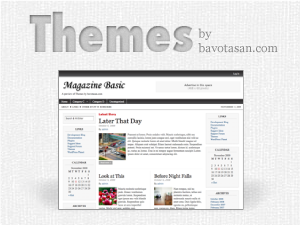
Magazine Basic v2.6 WordPress Theme
Since I have been doing all this talking about WordPress 3.0, I thought it only fitting to start incorporating some if its features into my themes. The first theme to get the upgrade is Magazine Basic. Version 2.6 also has the Arturo Theme Engine v2.0 installed to give a smoother experience while configuring the theme options. The new MB is currently available for download off of WordPress.org.
Here are a few of the new features:
- WordPress 3.0 menu system
- WordPress 3.0 background editor
- Arturo Theme Engine v2.0
- Ajax save function
- Cleaner code
If you require help or support, please visit the Support Forum and ask all your questions there. Questions about themes or plugins posted in the comments below will not be answered.


Dear Bavotasan:
The new 2.5 version of Magazine Basic has a number of issues with the layout and I’d like to go back to using the earlier version (for instance, MB 2.5 doesn’t recognize parent vs. child postings in the nav bar.). Are earlier versions available anywhere for download?
I think I’ll try this theme on the next site I create. What does “Superfish” menu mean btw?
A SUperfish menu is a type of drop down menu build with jQuery. It is an open source script available here:
http://users.tpg.com.au/j_birch/plugins/superfish/
I am using MB for couple of wordpress sites I maintain and I love it. I need a bit of help with the following: how can I preserve some basic formatting (e.g., text decorations for links, italics etc) on the front page? I have worked my way through the style.css file but I was not able to find where/how the formatting is suppressed for the front page.
I am looking for the formatting of the calendar, specifically the text of the month name and normal dates that don’t have a tag on them. Warm regards
beautiful themes
simple and nice themes.
Very nice and clean theme. Did you in new version of Magazine Basic v2.5.4 have solved issues with v2.5 mentioned above?
Very nice one -Thx !
I’ve just a question, I don’ understand how is setted the leftcontent (in the mainwrapper) ?
I’m trying diferent themes ande I think I like MAGAZINE BASIC the most.
QUESTION:
1) POST’S “TITLE” AREA – How can I change the FONT SIZE in a post’s Title Area?
2) Also – In the actual post area, when I aqply “Heading 2″ or “3″. the size is changed, but not when I see the post on the front page??
Thanks,
Jay
The font size in controlled by the style.css file. You need to edit the CSS in that file to change the font size.
If you are using the excerpt for the front page, it will strip all your tags. Use the content instead.
Where in the CSS file. There are many instances of “post” and “font”. I basically want the post “title” to be smaller on my front page. I went to the Style.css file, but I don’t know exactly where to change the font size.
You are look for .ind-post h1, .twopost h1 and .threepost h1 in the style.css file.
Dear Mr. Bavota,
I took you direction and went to:
.ind-post h1, .twopost h1 and .threepost h1 in the style.css file. I changed the font sizes and still- on the FRONT PAGE the font size in the MAIN POST TITLE does not change. The size of that first post title is too large for my tastes.
Am I doing something wrong.
Thank you so much.
I would need to see the site. What is your URL?
I’m using Magazine Basic theme, it’s great!…
Saludos desde Argentina!
Hi there Bavotasan,
I am keen with your MB theme and should be very keen to be one of your five. Is it possible for you to create a few more page templates, for example a Blog/Discussion format that looks more classically blogish? The benefit of this is that pages where comments are turned off of regular posts that are quality content not for commenting on, can be left tidy and the discussion blog can look more traditionally blogish?
Dom
Hey, it’s a nice magazine theme, but I think if you try a bit harder and add some widgets on lower area then it can look much better, also Does it come with admin options?
It’s got options up the wazoo.
Hi, I¬¥m using this theme on my blog and I¬¥m so happy with this. I¬¥m having a few problems editing the “header and footer” because I can¬¥t show the categories I want because i don¬¥t know what are the “category ID” Can anyone help me with this? thanks a lot and good work
If you go to your categories page and hover over one of the categories you should see the ID in the bottom of your browser. If not, click on a category and you will see the ID in the address bar.
wow, great work! Thank you for sharing
It looks very professional. Amazing how wordpress can be customized.
Time to switch to wordpress from that blogengine I’m running
hello all
having trouble with the catagories on menu bar.i have some long catagorie names and only 8 will show on the header menu bars.
what can i do to fix this.
hi,
i installed the theme, like it, but the layout gets disrupted when i install the wordpress.com stats plugin – the rightmost column slips under the other one. can you please help me solve this? thanks in advance!
Looks good to me in Firefox 3.6. If you are still having this issue in other browsers I suggest just hiding the little smiley face that appears from the Stats plugin.
Add this to the Custom CSS box:
thank you!
i used this themes, look great.. very clean, buti got a problem.. how to appear the pic on frontpage?
I am using Magazine Basic on wordpress. I am having a problem getting the second sidebar to work. I am trying to get one on either side. The second one is showing up below the first one. Any idea?
I love your magazine basic theme and use it on a couple of my blog sites. On http://www.sellingtogiftshops.com, I have the older version. Lately, I have noticed that my category lists in the side widget and in the header are not showing. Thinking the problems was due to using the older version, downloaded the newer version(2.5.6) but when I try to upload it to my site – either through the blog itself or through my ftp program – I am told that the upload failed.
I am not particular about having the new upgraded version, but would like to have my categories listed again.
Thanks for your help,
Sandy
[email protected]
Hello,
suggest to update your version of your theme, it’s like WordPress you should always use the latest version.
I am using this theme on several sites in Germany and it is indeed very clean, looks great and is easy to handle/edit.
Keep up the great work.
I’m using the version 2.4.2, which works very stable. If I try to upgrade or install to 2.5.6 the screen went blank. Also i have no more access to wp-admin, even the Visitor see a blank (white) page. I don’t know where to start the troubleshoot, ’cause I get no error. The screen went blank, and that’s it! Former problems with the provider are solved with .htaccess (for parsing php 5) and php.ini (memory Problem). But I have no idea what’s the problem with the upgrade from MB 2.4 to 2.5 is.
Any Idea, what goes wrong?
Make sure all your plugins are turned off before switching over. There may be a conflict with a plugin that is causing some issues.
have you tried version 2.6.1?
this theme is better than Atahualpa.
Hiya,
Is it possible at all with a future update or with a plug in to have thumbnail of photos on the homepage with the articles?
my bad, forgot to set 777 permissions
You need put chmod 666 no ?
Both will work but 666 is a bit more secure.
664 should work as well and it is even more secure.
Hiya,
Is it possible to tweak the excerpt length? For example the latest post will only show an excerpt of approx 30 words, leaving a lot of empty white space.
Regards,
ps where can I donate?