
Jan
12
2012

Update to Add Logo to Admin Plugin

by   |  Posted in Articles  |  19 comments

I have had a lot of requests to revisit and update my Add Logo to Admin WordPress plugin so today I sat down and went over the code. There have been quite a few changes in WordPress 3.3 so I had to make things a little different but the plugin is now compatible with the latest release of WP.
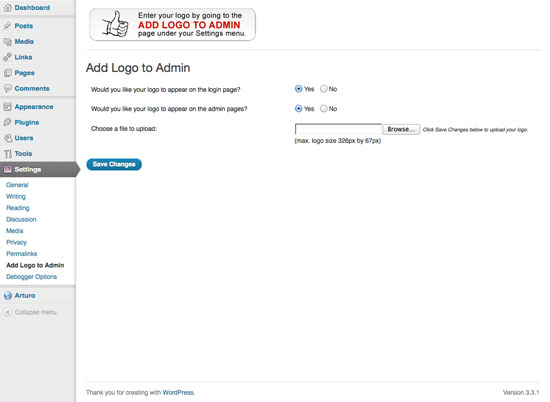
If you have any feedback please leave a comment below or open up a discussion in my support forum.

About the author:

A freelance web developer living in Montreal who spends most of his time writing for this site and building Premium themes for WordPress. You can find him on Twitter @bavotasan.

Site5 Affiliate Link
Share the love...

Tags: , , ,

Short URL: http://bit.ly/ABeuZv

Discussion 19 Comments

  1. Ejaz Alam on January 15, 2012 at 12:29 pm

    Well c.bavota this seems to be an excellent idea to add logo to our admin panels. I have downloaded it and will let you know about the experience. Anyway I must say that it really a novel idea to spice up admin panel. Regards and good luck

    • mua sam vui on May 21, 2012 at 8:17 am

      YEst ! it’s an excellent idea, special when i sell my theme , i want admin has my company’s logo !

  2. Web Design Bournemouth on February 6, 2012 at 6:46 pm

    Thanks, I’m new to wordpress and things on your site are very helpful.

  3. Joao on February 10, 2012 at 10:38 pm

    Hi,

    Just wanted to drop a quick note to thank you for the plugin.
    I find it very useful.

    Cheers,
    Joao

  4. Jack on February 17, 2012 at 7:30 pm

    This is so helpful! I’ve been looking for a workaround and this fits the bill perfectly. Thanks for sharing!

  5. xtendedview on February 25, 2012 at 3:43 am

    I am using total 25 wordpress plugins on my website. I know that using too many wordpress plugins is not recommanded it increase the cpu resources and also the loading time.

    So can you tell me how can I change the Admin page logo by manually editing the php or CSS files from wordpress folder?
    Hope to get better answer. Thank you in advance.

  6. MU engineering on February 25, 2012 at 3:58 am

    By adding this logo in admin panel is easy from editing the php files. But this is very good plugins because it really help for those people who are poor in coding and editing.

  7. TechTushar on February 25, 2012 at 4:03 am

    This plugin is available to download via official WordPress plugins directory this means no doubt it is trusted one. So I am downloading it . :)

  8. Wynona on February 27, 2012 at 9:20 pm

    I love this plugin!

  9. Okan on April 14, 2012 at 10:13 am

    Hi,

    Thank you for a great plugin. In the new version: The login image link is pointing to wordpress site. How can I change this?

    Thank you.

  10. Grafik on April 18, 2012 at 11:10 am

    That comes very handy especially when you’re making a website or a blog with wp for some firm/company. Keep up the good job and thanks!

  11. Roger Mawinski on April 20, 2012 at 10:10 am

    How to make the logo an animated flash or gif, anyway to easily do that?

    • c.bavota on April 23, 2012 at 12:50 pm

      This plugin would allow for an animated gif but not a flash file.

  12. Terrance on April 21, 2012 at 5:28 pm

    Awesome plugin – makes everything so much easier, and this plugin shouldn’t slow a site down at all it’s not that it loads every page load or anything…

  13. Donald Teel on April 23, 2012 at 6:27 pm

    Can I modify the code in the Add Logo to Admin plugin so that the redirect is NOT resolving to WordPress.org?

    • c.bavota on April 24, 2012 at 1:05 pm

      THe way it works is that plugin replaced the background image CSS on the login page logo. The anchor link still resolves to WordPress.org though. I will have to look into a way to modify the link. Not too sure how easily it can be done.

  14. Laurent Matignon on May 14, 2012 at 6:01 am

    Add Logo to Admin is one of the new functions of the brand new WooDojo plugin from Woothemes (it works with every WordPress themes, not only those created by Woothemes).
    I’m hesitating between this one and yours : as I’m using a lot (means : “too much” ;-) ) of plugins on my website, my priority is the plugin to be light, as light as possible. So I guess yours could be the best (because WooDojo is a full set of features) but how can I be sure ? I know P3 Plugin Performance Profiler could do the job but I doubt it could be very accurate for such a light plugin, right ?

    • c.bavota on May 14, 2012 at 2:37 pm

      I not familiar with those other plugins but I can tell you that this plugin is very lightweight.

  15. car insurance for young women on May 22, 2012 at 5:01 pm

    You always have a way of making it so easy to follow your thoughts and what you’re sharing with us. Thank you very much.

Leave a Reply

Your email address will not be published. Required fields are marked *

*


To enter code in the comment box, please place it between <pre lang="php"> </pre> tags. You don't have to convert any characters to their hex/HTML code. Just add your code the way you would to any code editor.