
Mar
20
2009

Displaying the Post’s Gallery in WordPress

by   |  Posted in Tutorials  |  7 comments

I just came across this function today and thought I should share it. Whenever you add an image, or video for that matter, to a post, it becomes a part of that specific post’s gallery. Little did I know that you can actually display your post gallery anywhere you want with the default function [gallery].

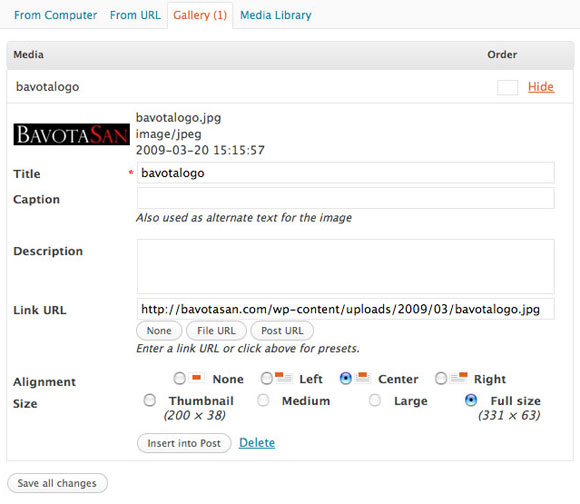
Your media uploader looks something like this when you have added an item.
gallery

Within your post, you can just place [gallery] and it will call up your gallery with the default options. You can also add a few variables to customize it.

Check out the WordPress codex for more info about the variables.

So something like this:

[gallery link="file" columns="3" size="medium" itemtag="div" icontag="span" captiontag="p"]

would create a gallery with three columns that displays the medium sized version of you pictures within a div tag, with the caption between a paragraph tag and each image between a span tag, linking to the file.

You can also just go to your media uploader and click on gallery to get the option to just insert a gallery with the options listed.

Another cool option is to actually add a post’s gallery to your theme. To do this you need to place <?php echo do_shortcode('[gallery id="ID#"]'); ?> wherever you want and change the “ID#” to the actual ID # of the post whose gallery you wish to display. All of the variable work for this piece of code as well.

About the author:

A freelance web developer living in Montreal who spends most of his time writing for this site and building Premium themes for WordPress. You can find him on Twitter @bavotasan.

Site5 Affiliate Link
Share the love...

Tags: , , ,

Short URL: http://bit.ly/8XIKDg

Discussion 7 Comments

  1. Iscar on May 30, 2009 at 4:49 am

    Nice blog!Thanks for the share!

  2. abel on June 3, 2009 at 9:12 am

    Hi,
    Nice post. Hopefully you can help me out with my problem:
    My theme has two columns:

    |post|entry-meta|

    I would like to display my gallery thumbnails under the entry-meta div rather than between the post’s text. Is it possible?

  3. Chloe Shlosberg on June 18, 2009 at 6:22 am

    Hi,
    I just tried to install this code in to my theme (I from your post)

    and I replaced the ID# with the name of my post, which was /17/06/09/le-lan/
    The problem is that when I saved it and tried to view it, I got this message:

    Parse error: syntax error, unexpected ‘<’, expecting ‘)’ in /home/content/c/h/l/chloel/html/wp-content/themes/magazine-basic/functions.php on line 69

    Now my site wont work at all, and I cant even go back into the editor to delete it. PLEASE HELP!!!

    • c.bavota on June 18, 2009 at 1:33 pm

      Hey Chloe,

      You need to replace the ID# with the ID number of your post, not the name. Where did you add the code?

  4. Sandip Saini on July 4, 2009 at 4:19 am

    I’m not big on commenting, but nice post. I always found good quality information from this site! I will keep visiting this blog very often.

    Nice blog!

  5. jspeters on December 7, 2010 at 11:16 am

    It took a bit too figure out at first but i soon got it..

  6. sid on March 31, 2011 at 6:41 am

    hi

    does anyone know how to give mouseover fade-in effect on each thumbnail of wordpress default gallery if using this shortcode method

    Thanks