Feb
16
2009
Excerpt and Content Word Limit WordPress Plugin
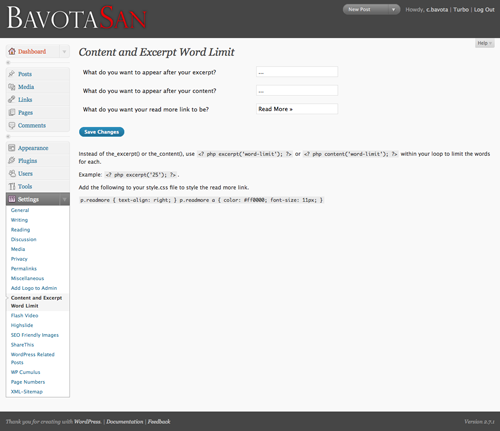
After I posted Limiting the Number of Words in Your Excerpt or Content in WordPress I thought it would be a good idea to actually create a little plugin for those who aren’t actually code hackers.
If you require help or support, please visit the Support Forum and ask all your questions there. Questions about themes or plugins posted in the comments below will not be answered.


Hello!
Thanks for your plugin!
I do not like working!
I am using theme Aeros 2.0 (http://thebuckmaker.com/aerostwo) and tried to put the syntax “” In the 4 files to using php but do not work.
Question: Your plugin only works with WordPress themes by defult?
I am using version 2.7.1 of WP.
Please could you tell me how do I get it working?
Thank you very much!
Greetings,
Eduardo.
Hey Eduardo,
Not too sure what the issue might be. I will try troubleshooting the plugin and let you know.
I think there is an issue with your magazine theme, because I get this error when installing this plugin:
Fatal error: Cannot redeclare excerpt() (previously declared in http://www.mysite.com\wp-content\themes\magazine-basic\functions.php:567) in http://www.mysite.com\wp-content\plugins\content-and-excerpt-word-limit\excerpt-content-word-limit.php on line 51
You are encountering an issue with installing the Excerpt and Content Word Limit plugin on my Magazine Basic theme because I have a similar function embedded in that theme. You can go to the functions.php to line 566 and change this area:
function excerpt($num) {to:
function mb_excerpt($num) {Then in the functions/widget_feature.php file just change line 20 from:
<?php excerpt('25'); ?>to:
<?php mb_excerpt('25'); ?>And then installing the plugin will be no problem at all. I will update the theme and make this change as well to avoid further issues.
Thanks, you are great!
Hi C,
I just installed your plugin and it works fine. One small problem for me is that the plugin only strips image tags – I often have posts also beginning with a blockquote and that doesn’t get stripped away.
Any solutions?
BTW I really like the content here – added to RSS and tweeted some of your posts already
Hey there – great idea for a plug in. It works‚Ķ sort of. If I add the code mentioned in the plug in, it strips out the sidebar . Something to do with ‘content’ instead of ‘the_content’?
That is probably because you have some tags that aren’t closed due to where the excerpt cuts it off. I guess I would have to make the plugin strip the tags. Hmm.
Hey i am trying to get this to work in my blog, I’m using the prosense grey template.
Could you please give more detailed insturctions? I’ve installed the plugin, and I’ve tried the wp_content code in my index but it does not work!
edit: i got it working but using prosense grey… it messed up the template with using content, it doesn’t with excerpt. I take it its the image messing it up?
I installed you comment length plugin and it works, but the comment is a funny font, sized approx 8px, and spaced double-spaced for the line leading.
I can’t find any styling added to it except postarea and my CSS doesn’t have a .postarea class just .postarea p and .postarea ul and the like. When I create a .postarea class it will style the comment output, but it messes up the comment heading which is an .
Got any ideas? I looked for styling in the php file in your plugin but could only find one for the read more link. I tried creating styling for the output but it broke the plugin.
Any ideas about why this is and what to do?
Is it possible to get the plugin to close a tag or strip a tag? if the content has a bold word where it cuts off the rest fo the front page becomes bold…
I think a function to check for unclosed tags is possible but would be quite complex due to the number of tags available. If only there was a <close all tags> type of tag.
i have a problem, the plugin work well but.. i am using the_content(’80′) but all image go at the start of post.. i think this is not normal, how can i fix it?
how can i set up the plugin to NOT strip tags. the only thing i want is to limit the words. nothing else. not stripping paragraphs, tags, etcera
Hi,
I have just tried downloading your plugin but the links broken, it is returning a file not found error??
Thanks,
Ken
The link should take you to the wordpress.org site to download the plugin.
Hi,
Yes, it is the link on the WP site that doesn’t seem to work, it returns file not found?
Do you have a copy of the plugin anywhere else so I can download it, or maybe you can forward a copy to me at [email protected]
Ken
can you make this so it does NOT include the words from an image caption text… i only want the content text, not the image caption as well…
thanks
That is possible and I will take it into consideration for the next version.
Hi, useful function … this worked 4 me
same locale as jonah
Hi from Madrid,
nice plugin but isn’t it possible to desactive in options the more link?
Hi,
I like your plug-in but would like “Read More” to hyperlink to the feed items original link, not to the permalink.
YAAB.Autoblogger does this nicely, but not with your plug-in active. Is there a way for me to do this? Thank you.
Hey Jim,
You would need to do a bit of hacking to make that work. I assume autoblogger creates a custom field with the original link so you would just need to crack open my plugin file and replace the permalink code with a call to the custom field.
Thank you. I will try that.
Hi all, thanks for the great plugin! I came up with a quick solution that strips the tags from the content:
Place this after line 58 in excerpt-content-word-limit.php:
It should strip any formatting automatically.
Cheers,
Jonah
Thanks dude! The author should have known better
This plugin is great but suffers one major problem which people here have already picked up on.
The inability to close tags.
I added these lines from Jonah but also changed the following (line 48) from:
to:
This worked for me but if your excerpt is cut off whilst in a different tag (other than ) you’re going to have problems.
PLEASE, PLEASE update this plugin to automatically close all tags, thus validating the markup.
I’m more designer than coder but I found this article which could be of use: http://www.wplancer.com/how-to-limit-content-in-wordpress/
@Jonny Wood,
Here is a cool PHP snipped to close all tags that I will implement into the plugin once I have a chance to update it.
How can I change this code to make it work? I always get an error..
What error?
Hi, just exactly how do I change the excerpt word limit to, say, 80, for example? I’m using Magazine Basic. Thanks!
Hi
Nice work , But it’s don’t work with my rss feed post ..
my blog get update via rss feed and the post comes to my blog in full text and i want to limit them .. can U help me please ?
Thanks
go west go east you are the best.
Hi Again
I fix the problem Now all my post limited , But the photo of my post not shown up in the front page , when i click redmore i can see the photo… is there any wat to show up the photo?
I usually don‚Äôt post on Blogs but ya forced me to, great info.. excellent! ‚Ķ I’ll add a backlink and bookmark your site.
I’m Out!
There is a small issue. For instance if i choose to display 30 words in CONTENT and the content finishes with then all the page is messed up, all showing in bold… Could you please add some sort of exclusion tags for , , , , etc… I mean if they are opened somewhere in the content they must be automatically closed in the end no matter what.
Thanks a ton,
Ciprian
Try putting the code between <pre lang=”php”></pre> or else it won’t come through.
Hi…
It works, but the pictures Of my Post do not show …
Is there anyone can fix it ? I really need This..
Thanks