
Add Logo to Admin WordPress Plugin
by c.bavota | Posted in Downloads | 136 comments
Feb
18
2011
I have revamped my first plugin to make it a little easier to use. If you have tried it before and weren’t impressed, please give it another go. I’ve included an image uploader so you can easily add your own logo and choose whether you want it to appear in your wp-admin and/or the Login page. You also have the ability to upload multiple logos and then select which one you would like to use.
Any feedback or suggestions would be totally appreciated.
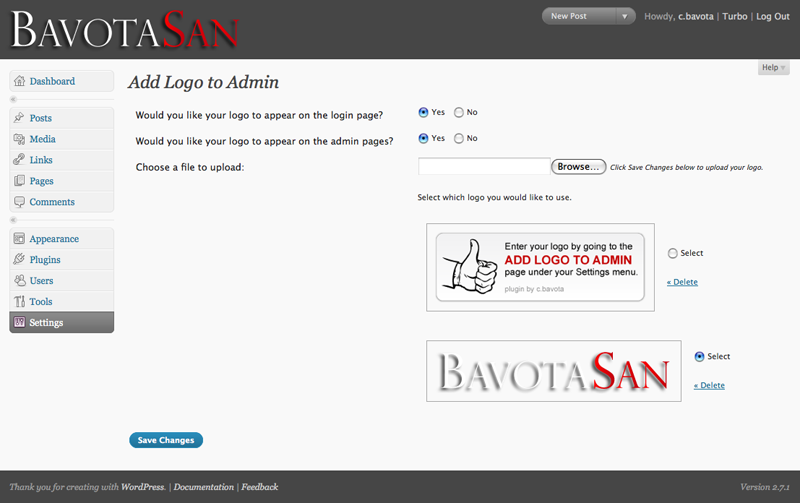
This plugin has been updated for WordPress 3.3.


And where are the settings in the admin panel to make all this cool stuff happen?
There is actually nothing you need to do to make it work other than activate it. Just upload your logo to the images folder of the plugin and call it logo.png and it will all work automatically.
Uploaded and activated. Doesn’t seem to do anything.
Hey tom,
Which version of WordPress are you using?
The Logo-trick still works, even with WP 3.2 (Beta). Make sure to check the image path.
Hello,
I am running wp 2.7 and got his error “Fatal error: Cannot redeclare add_logo_to_admin() (previously declared in /home/content/g/l/e/mydirectory/html/attraction/wp-content/plugins/add-logo-to-admin/trunk/add-logo.php:12) in /home/content/g/l/e/gmydirectory/html/attraction/wp-content/plugins/add-logo-to-admin/add-logo.php on line 11″ when I tried to activate this plugin.
Thanks,
Glen
update to latest version, no prob with that
Greetings. I am experiencing the same problem.
I am using a new install of 2.7. I used the plugin install feature in the admin dashboard to install. I uploaded logo.png (74×70, 54,850 bytes) to /public_html/wp-content/plugins/add-logo-to-admin/trunk/images/ , replacing the logo.png file that was there.
Hey Glen and BobG,
This is my first plugin and I obviously messed up with the install to WordPress. I have just updated it to version 1.0.2 to fix all these issues.
Chris,
Sorry for the snarkiness (is that a word?) of the comment I left. I was just short of time and hit ‘submit’ before I looked back at it. I’m running 2.7 and it seems that your recent update fixed the problem. Thanks. It’s little touches like this that make a blog feel personal and it’s programmers like you that make it all possible. Thanks again.
Hey Tom,
No worries. Thanks for letting me know that it wasn’t working properly.
Is there a proportion limit on the graphic? I used one that was taller and not as wide (proportionally) as yours and it stretched it. I made one the same dimensions as yours and it worked fine.
Scratch that – it was a cache thing. The new graphic was displayed but with the old graphic’s proportions. After I cleared the cache, it worked fine.
Sorry for that, but i see my logo only on wp-login page not in admin? I run WP 2.7. On the web test.mysite.com works good but on mysite.com i see logo only on wp-login.php. All browsers same. Cache cleared. Any idea, pls?
Nevermind, its working now, i switch all plugins off, and looks like that Audio player 1.2.3 when active, this not work at admin page, any idea to fix it?
Nevermind again, fixed with new beta of Audio player 2.0b6. Works good, thx!!!
I’ve tested your plugin, and i’ve found a ‘bug’ and it’s solution. When WordPress it’s not installed on the root of the server, the icon doesn’t shows on login screen, but works fine on admin pages.
To solve it all you need to do is change the value of the imgSrc variable on login.js and remove the “../” from the value, otherwise it will make reference to a non existent image.
Hey eKLIPse,
Thanks for the solution to that issue.
I see in your login.js that you do the following thing:
window.onload = addLogo
This is a very dangerous thing to do, because, in this way, you overwrite all previous actions that already should be done at the onload. It is better to do something like the following:
var onloadOrig=window.onload;if (typeof window.onload != 'function') {
window.onload = function() {
addLogo();
};
} else {
window.onload = function() {
onloadOrig();
addLogo();
};
}
This way, you keep the original functions in the window.onload intact.
Hey Johan,
Thanks for the tip. I have gone in and updated the plugin using a slightly different version of the code you suggested. I also upgraded the plugin a bit by adding an option page in the admin. Take a look for version 1.1 on the WordPress site.
Excellent one. Really worked perfectly.
Never nice. Got it working with a couple of issues.
How can I center the image?
Not working. Does wordpress have to be in the root folder or can it be in a separate wordpress folder?
Using 2.7.1. Is it Compatible?
Hey Jim,
You are correct. It wasn’t working when installed in a subfolder. I have just updated the plugin and now everything should be fine.
I am getting a red x in a blank screen on both the admin pannel and when logged in. Any suggestions as to why this is happening. Is it possible that the image is too big?
Hi,
I used older version of your plugin with success, but, i can’t use this new version with my WordPress 2.7.1.
It’s very strange because my logo appeared on your plugin setting page but never on my admin panel or login panel ???