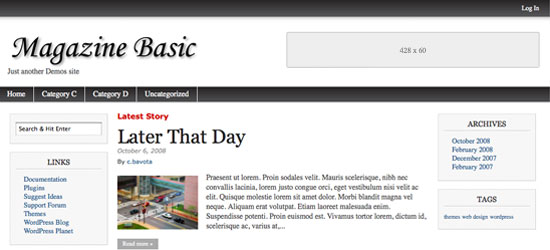
Magazine Basic Updated for WordPress 3.1
by c.bavota | Posted in Articles | 62 comments
I just submitted Magazine Basic v2.7 to WordPress.org. Hopefully it will go live shortly. For now, you can download the theme directly from http://themes.bavotasan.com/our-themes/basic-themes/magazine-basic/. Once it is available on WordPress.org, you can use the automated upgrade feature in your wp-admin.
This is the first version of Magazine Basic that no longer uses four different files for the front page layout options. Now everything works through the loop.php file. Having all the code in one place makes it a lot easier for modification, it also eliminates all the extraneous files and makes the theme a lot more efficient. Another major difference is the location of the Magazine Basic theme options. The page is now located under the Appearance panel in your wp-admin. This is due to a recent requirement by WordPress to now contain all of your theme option pages to the Appearance panel. This makes a lot of sense since all of the other core theme options are located in the same panel.
A new feature that will only be available as soon as WordPress 3.1 comes out is post formats. Now you can set your post to be an image, aside, video, gallery, link or audio and it will be displayed differently according to the format that you set. I will be updating the demo site shortly to show this off.
Please let me know if you encounter any bugs or have any feedback.


Well, I am a bit disappointed – I am using a PNG as a Header Ad Logo in Magazin Basic and it is not showing up in Firefox, Opera and IE works, but not FF. Why?
The picture itself actually shows if I point firefox directly to it, so this is not an issue with with PNG interpretation or picture properties like color depth etc. When I replace the picture with another one, the problem stays – FF does not show it.
These are really basic things and if I would like to buy a theme I do not want to spend time myself debugging this kind of stuff, even if I could – if I had time still doing these kind of things I would make my own theme, the whole point in buying a theme is saving time and NOT beeing confronted with hours of debug sessions to get things going – I now Magazine Basic is for free, but do you really think it is a good marketing strategy to publish themes that have serious problems with cross-browser compatibility with *really* basic stuff? Think twice! Do your homework!
You need to use an absolute path to your image, or else it will probably only show on your front page. If you check out the demo of Magazine Basic, in any browser, you will see the logo image appear perfectly on every page. This is the absolute path I am using:
http://demos.bavotasan.com/images/magazine.png
Try adding the above link in the Header Logo field. If that works for you, then the issue is with the file path you are using, and not with the theme.
It works for me and has since I started using the theme several months ago. Make sure your path is correct : Mine is /wp-content/themes/magazine-basic/images/headerfilename.png. If entered correctly, you will actually see an image of your header file just below the path. I have not used the Header Ad only the Header Logo.
When I click on a post, my side widgets move to the bottom of the page. I don’t like that. What was the previous version so I can re-download and re-install?
I just reinstalled the previous version. I love your theme, btw.
It’s a small bug. The solution is here: http://themes.bavotasan.com/support/discussion/430/side-bar-oddity-widgets-float-under-posts-pages/#Item_7
I will be releasing another update by the end of this week to fix all the little bugs that users point out.
How did you reinstall the old version..please help me my site is a mess now..
Hello, Magazine Basic (free version) is just perfect to me. Thanks for that.
However, the latest version of 2.7 is somehow my problem. I was very convenient with 2.6.12 while developing my own designs. Now I am getting lost in the loop.php.
How can I reinstall the previous version?
Or how can I change the format of an option layout?
Combining all loops into the loop.php file makes everything about the theme so much more efficient. Once you play around and get the feel for it, it will make a lot more sense.
If you want to change the single post page layout, you need to edit everything in the conditional tag
is_singular(). That also controls the single pages. The loop.php file relies heavily on conditional tags so read up on those.http://codex.wordpress.org/Conditional_Tags
A small bug. In the theme option, I select the Author NOT to be displayed in the home page as well as in the single post. However, the Author is still displayed. Please check and fix it. Many thanks.
This seems to be a mistake:
if(theme_option(‘authors_index’) == ‘on’) { echo ”; the_time(get_option(‘date_format’)); echo ”; }
if(theme_option(‘dates_index’) == ‘on’) { _e(“By”, “magazine-basic”); echo ‘ ‘; the_author_posts_link(); }
Here is the solution to the bug:
http://themes.bavotasan.com/support/discussion/430/side-bar-oddity-widgets-float-under-posts-pages/#Item_9
Hi, I was a bit surrprised when installed new version of your template Magazine basic…the page was partly broken …and looked quite bad…but…after few minutes with fine tunning of parameters, now the page is quite well, working properly …Great job ..
There are a few little bugs. Just waiting for some more feedback before I release a small update to fix them all. Expect something by the end of this week.
Hi what I like is the main page….even I have different lenght of posts due to photos and also the text, the page looks well … I have also find the bug /my fault) that there was sign “Not gfound ” on all pages..it was eough to decrease number of post in basic settings of wp …again great job…be sure when i ear some few money from advertisement, I will upgrade the template to magazine flow, which looks really amazing….
Tks. Look forward to the next release.
The description mentions a flexible width option. But there are only 800px and 1024px available. How to get flexible width working?
Those are the two “flexible-width” options. WordPress only allows certain tags and since this theme offers two widths, I felt that the “fixed-width” tag was not appropriate, and the only other tag available in regards to width was “flexible-width”. Literally, it might not be the best tag to use but it is the best option with the limited tags that are available.
Pl. fix the authors display condition in featured post widget also.
Hi, After trying a long list of different themes I think I’ve finally found one that really does it for me. Great job!
I’m not sure if my problem is down to a bug in the new version (not having had any experience with legacy versions) or just because I’m not the strongest coder in the world – Anyway.. I’m trying to change the font sizes of my posts. I find them a little too big for my taste, but no matter what I change in the style sheet, I seem to be getting no result. I’m editing in the “leftcontent” part, but no luck so far
I am a fan of Magazine theme. Thanks for the update.
I love the theme. How can I customize its homepage? (That is not using the four options).
My pictures on the Front Page changed size…why? I want them as before.. all same size .. Please help
Sucks, all the pictures are wrong now!
When I click on links the left sidebar appear on the right…. ohhh no….never updating this again… was it you or an employee doing it.?
Calm down. Magazine Basic is just very good. You should explore child theme http://bavotasan.com/tutorials/creating-a-child-theme-in-wordpress/ for next update.
I dont want it, I need the old one!!!! Help me please!
Hey JohnG, you should take a look at the support forum. Many of these issues have been addressed. Also, an update fixing all the bugs should be out in a few days.
I updated the 2.7.2 version. It works well when I have two posts. But when I have three posts, then the righ-side bar went to the bottom, just above the footer. How can I fix this?
Do you have any HTML inside your post content?
No, I don’t. I fixed that problem by posting the fourth article. Then it is now OK.
I am a new user to WordPress. My site is hosted by my school for experimentation and I found Magazine Basic while looking for a theme. It is almost exactly what I’m looking for “out-of-the-box”.
Thank You So Much.
I got a “Stylesheet is missing error” when I updated.
It’s probably me! How to fix?
Nevermind! I re-installed and all is good.
Love your themes! I have Magazine Premium on another site and it is terrific!
I have the new version of MB, how can I do New Posts show down at the Bottom on the mane page?
I need New Posts show up Under the Old Posts.
Thanks, I love it!
MB displays posts from latest to oldest. If you want to switch that you would need to modify the core WordPress loop in the loop.php to display the posts is descending order. You would need to modify the query_post() function.
Hello,
I have installed Mag Basic on my site, it’s a very good work, just a bit long to customize as I wanted
.
Just a little prob, I try to change the white font color of the left top section in the header ( connected as : NAME ) and i can’t find it in the CSS. Could you please help me ?
Otherwise, you can take a look to my homepage (better with FF), I add a top widgetised colomn, I think you must think to this for your future update, it’s seems to be nicer, but you have already done a great job.
Thanks and sorry for my bad english…
Hello
I’m glad magazine basic, one problem in Internet
explore the texts are orange instead of black firefox
thank you