
WordPress 3.1: The New Admin Bar
by Bandicoot Marketing on | Posted in Tutorials | 9 comments
I have been playing around with the latest release candidate for WordPress 3.1 and some of the new features are pretty cool. I really like the admin bar and I spent a bit of time yesterday figuring out how I could take advantage of it for my themes. All I really wanted to do was add my theme options pages so that they can be easily accessible. Luckily, there is a new action I could hook into called admin_bar_menu().
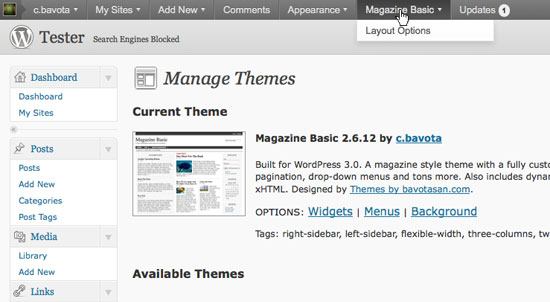
First we need to add an action to our function.php file.
add_action( 'admin_bar_menu', 'add_menu_admin_bar' , 70);
The 70 at the end indicates where the new menu will appear. If you want it to appear first on the left, you can leave that parameter blank or set it to 10. The number needs to be in increments of ten to set where the menu will appear. 70 will make it appear after the Appearance menu items.
Now we need to create our function which will use the global variable $wp_admin_bar to add the new menu items to the admin bar.
function add_menu_admin_bar() {
    global $wp_admin_bar;

    if ( !is_super_admin() || !is_admin_bar_showing() )
        return;

    $wp_admin_bar->add_menu( array( 'id' => 'theme_options', 'title' =>__( 'Magazine Basic', 'magazine-basic' ), 'href' => admin_url('admin.php')."?page=magazine-basic" ) );
    $wp_admin_bar->add_menu( array( 'parent' => 'theme_options', 'title' => __( 'Layout Options', 'magazine-basic' ), 'href' => admin_url('admin.php')."?page=magazine-basic" ) );
}
The add_menu() function accepts the following parameters:
- title
- default false
- href
- default false
- parent
- default false – pass the ID value for a submenu of that menu
- id
- defaults to a sanitized title value
- meta
- default false – array of any of the following options: array( ‘html’ => ”, ‘class’ => ”, ‘onclick’ => ”, target => ” );
Putting it all together into the function.php file would look like this.
function add_menu_admin_bar() {
    global $wp_admin_bar;

    if ( !is_super_admin() || !is_admin_bar_showing() )
        return;

    $wp_admin_bar->add_menu( array( 'id' => 'theme_options', 'title' =>__( 'Magazine Basic', 'magazine-basic' ), 'href' => admin_url('admin.php')."?page=magazine-basic" ) );
    $wp_admin_bar->add_menu( array( 'parent' => 'theme_options', 'title' => __( 'Layout Options', 'magazine-basic' ), 'href' => admin_url('admin.php')."?page=magazine-basic" ) );
}
add_action( 'admin_bar_menu', 'add_menu_admin_bar' ,  70);
Just make sure it is between the PHP tags.
I’ll be messing around with WP 3.1 for the rest of the week and posting about my discoveries so keep checking in.
9 comments for “WordPress 3.1: The New Admin Bar”