
Gridiculous for WordPress
by c.bavota | Posted in Downloads | 45 comments
Jul 09 2012
I’ve been working on a WordPress theme for my Gridiculous boilerplate for quite a while and I’m finally finished. I submitted it to WordPress.org but it usually takes them a while to approve a theme and put it live so for now I’m going to post the download link below
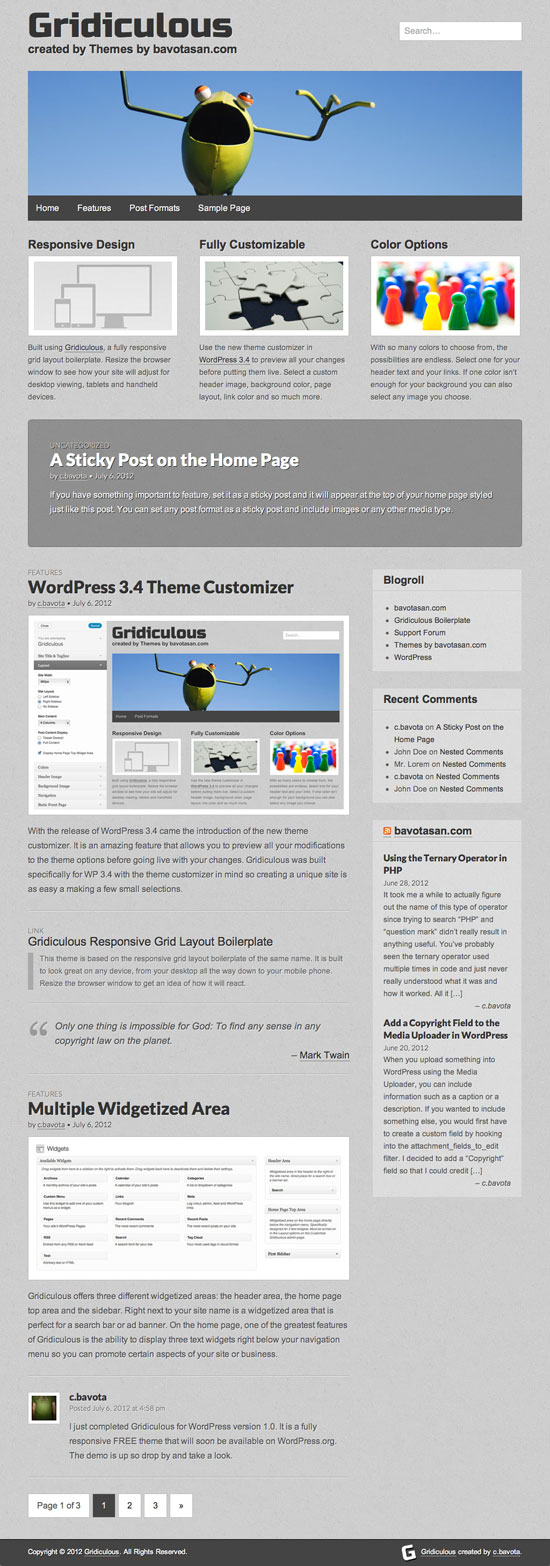
Here are a few of the features:
- Built for WordPress 3.4
- Responsive Design
- Fully Customizable
- Color Options
- Supports Multiple Post Formats
- and More!
Gridiculous for WordPress is completely free so download it and test it out to your heart’s content and let me know what you think.


Nice theme. I like the widgetized homepage
it’s suite for persional blog, i have try and it’s acceptable
Although I like what you have done there, I cannot help but thinking that you’re going back to tables with the rows…
I really like the look. Can’t wait to give the Theme a try once available on wordpress.org
The theme looks gorgeous! I hope the theme background is while or lighter. Current background is a bit dark.
You can set the background to whatever color or image you like.
This theme looks great! I am certainly going to try it out once its available.
Really interesting.
I made a “small” review.
Cool. Thanks.
What are wordpress team waiting for? This is really nice theme.
(They might scan your theme security for a while, nowaways, many free wordpress themes have hidden scripts)
The issue was that I tried to make the theme backwards compatible and they are opposed to that on WordPress.org. I’m going through it now trying to comply with the very rigid theme review requirements.
Wow that’s really wonderful theme, thanks for sharing with us…. thank you very much……..
Nice work Chris! Love the responsive grid! Great Front Page Layout as well!
Great job! I am wondering if this theme can be suitable for a dictionary blog. I am building a new blog which contains word list, a dictionary-like blog.
I’ve been looking for a theme to trick up one of my old sites, and this one looks perfect – thanks Chris! (can’t believe you are giving this away for free).
hi,
i am not good in php coding… i want to built my own template for my web site.. is there any software available for developing website template for wordpress.. can u plz help me.
The best thing to do is download something like Gridiculous for WordPress and create a child theme based on it.
Beautiful theme! Just the kind of thing that would benefit our blog.
Thank you very much for providing this free theme. I only design sites on the side and am very new to WP. I’m using Gridiculous for my third WP site and I really like the way it looks and functions.
Again, thanks!
-Bill
How do create custom sidebar areas that appear to be within the Appearance > Widgets page in your screenshot above? (i.e “blogroll, etc..” Hmmm appears thats the default posts page template hense default widgets… Y NO SUPPORT FOR SIDEBARS??? Looking to be able to create custom sidebar’s which you can place widgets via Appearance > Widgets and selecting a “Sidebar” Page Template via Pages > “Page” > Page Template.. Thanks @sniffytobias
There is only one sidebar by default in Gridiculous. If you want to add more you would need to modify the core functions.php file to register another sidebar. Then you would need to add the proper code to the other theme template files.
Thank you. Beautiful theme. Very nice clean look. Love the froggie pic. Hated to have to replace it. Using it on my first e-commerce site.
Thanks for the theme. I’ve used it as a static website to help out a friend who’s business is slow, and although I may still need to work on the Pages/Categories structure, I think it looks quite professional and certainly knocks spots off local competitors sites.
It’s just gone live and if it brings in the business, then I’ll be the first to suggest she sends a donation in your direction.
Thanks again.
how can I add the bottom boxes to my webpage or edit the one that I?
What do you mean by bottom boxes?
The items under the menu bar. For example, on your layout design above the “boxes” that I am speaking about you have entitled “Responsive Design,” “Fully Customizable,” and “Color Option.”
How do I create like “boxes” or columns on my page and what is the appropriate technical term for the “boxes”
This is an amazing theme. Thank you so much for providing it to us! I will definitely check out your premium themes for my future sites.
I am trying to get the header widgets to go vertically instead of horizontally. Can’t seem to figure out how to do this. I want to place something above the search box, but no matter what I do it just put it all side by side.
What do I need to add or change to get it to work?
I also can’t seem to register on your support forum. It won’t send me the email with the password, even though it says it did. Can’t get it to reset my pass, either (since it won’t allow me to register a 2nd time). Won’t send me that email, too.
By default, the header widgets align side by side. If you want them to fall below each other you would have to use CSS to clear each element. Add this to style.css:
.header-widget {clear: both; }I’ll send you a login manually for the support forum.
Thanks for that…and the password for the forum.
A friend and I messed around and finally figured out that changing float:right to text-align:right accomplished what I wanted, and I like the results much better.