Feed Me, Seymour 1.1

Posted on June 19, 2009  |  Category: Downloads

fms Feed Me, Seymour 1.1I have just updated Feed Me, Seymour to work with WordPress 2.8. I have also cleaned up some of the code and modified the admin interface. Version 1.1 is only available on this site. Just click the download button below.

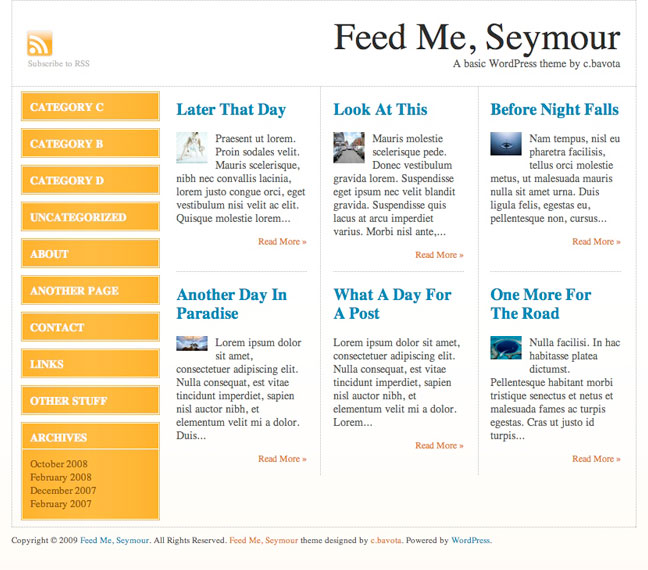
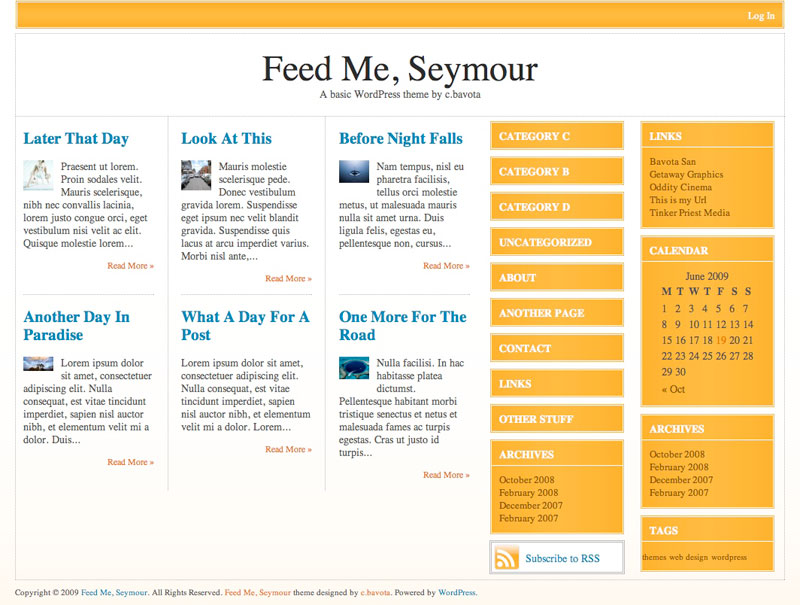
Feed Me, Seymour simulates the look and feel of what I think a news feeder site should look like. Not too sure if I succeeded but I think it looks kind of cool. This theme features the same backend theme options interface as my Magazine Basic theme , so there are many different way to configure it to make it look the way you want.

Here are some examples of different layout options.
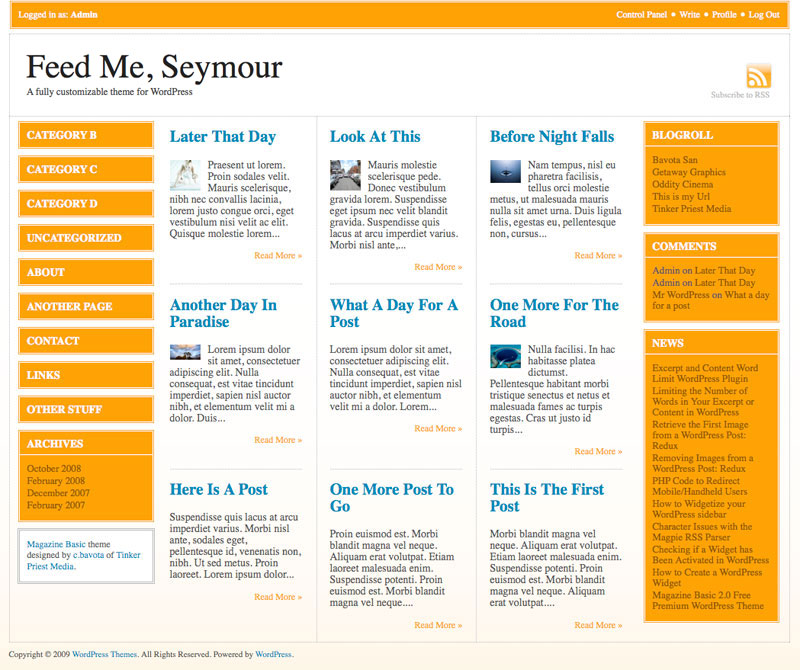
feedmeseymour 200x167 Feed Me, Seymour 1.1feedme2 200x175 Feed Me, Seymour 1.1feedme3 200x151 Feed Me, Seymour 1.1


For more info go to Themes by bavotasan.com.

Download Demo

Tags: , , , , , , , , , , , , , , , , , , , , , , , , , , , , , , , , , , , , , , ,

Short URL: http://bavotasan.com/?p=279

helpIf you require help or support, please visit the Support Forum and ask all your questions there. Questions about themes or plugins posted in the comments below will not be answered.

65 Responses to “Feed Me, Seymour 1.1”

  1. Chris, this is a really great theme! I can’t wait to see your next one (seriously, where is it?)!

    #349
  2. Eric

    This is a great variation on a magazine theme. However I can’t get the “read more” links to go to the post. The “read more” just reopens the blogs front page. Am I missing something? I read your post on the more tag, kind of above my grasp. Does it apply to this theme?

    #435
    • Hey Eric,

      Just noticed what you are talking about. Totally passed by my testing. I updated the theme and it is awaiting approval on WordPress.org.

      #443
  3. Eric

    Addendum: I also notice that it does the same thing when viewing the demo using the above link.

    #436
  4. Eric

    Thanks for the quick response. I’ll be waiting for the Download. Great theme.

    #444
  5. Tab

    Hey this may be a dumb question but how do I get a picture to show up on the main page next to a post as you show in the demo. Is it a Custom Field? if so what is the Key?
    Because the image does not appear on the front page when it is just inserted into a post.

    #495
    • Hey Tab,

      Feed Me, Seymour is not built with images on the index page. But I did include a handy function in case you did want to add an image from your post. Use <?php getImage(‘1′); ?> to grab the first image from your post. Change 1 to 2 if you want to grab the second image from your post, and so on.

      #511
  6. I love this theme and am having fun working with it. Is there a way I can enable comments on a page (not post)? I have it checked to allow, but a comment box does not appear. (e.g. on our “Ask Me” page)
    Thanks in advance.

    #654
  7. I love the look and feel of Feed Me! I’m encountering one issue though. There appears to be a disconnect between Current Widgets settings and the widgets that actually appear. For instance, I have no widgets activated for either left or right, but Categories and About and Archives also show up. If I enable left and right Sidebars in the layout, sometimes the widget is duplicated on both sides. It’s very confusing.

    I would expect no widgets to show up by default, for them to reflect exactly what is in the Widgets control panel. Assistance appreciated!

    #827
    • Hey Brad,

      I have some “widgets” that appear by default that should disappear once you add your own widgets. But if you keep switching the layout that might reset the widgets in the second sidebar and may cause what you are seeing. I took a look at your site now and it looks like you have different widgets set.

      #831
    • The only Widget I have activated is the AdRotate:Affiliates on the Left Sidebar. Nothing else is activated under my Current Widgets in the control panel.

      #834
    • I just added a widget to the right side bar, and all default ones just disappeared. I’m not sure why it works now, but I think the problem fixed itself!

      I’ll let you know if I encounter any more strangeness.

      Brad

      #835
  8. I love the theme, it is now our main page for our site! One question, For new pages when I choose a parent at time of creation there is no “hierarchy” offset and the parent page does not show it has a child. Is this by design or am I missing something?
    First time PHP user, life long MS guy, and I’m loving PHP!

    #903
  9. RaiulBaztepo

    Hello!
    Very Interesting post! Thank you for such interesting resource!
    PS: Sorry for my bad english, I’v just started to learn this language ;)
    See you!
    Your, Raiul Baztepo

    #1177
  10. Since you describe it as a theme for news feeder site, I have a very simple question (mind you, I am not a pro with WP):

    How will the news feeds (or any other feeds, for that matter) automatically start pouring into the blog?

    #1258
  11. I am really enjoying your theme! I do have a question if you don’t mind…

    On my home page on the posts in the comments section, the leave comment shows vertically i.e. this is what it looks like:

    Leave
    a
    comment
    Logged
    in
    as .
    Log
    out
    »

    Can I change that so it reads horizontally?

    I added the comments on the page.php and that is how I’d like all of them to look.

    Also, I’m new to this website design stuff, but in my posts under the title it says By (blank), where do I change that so there is an author name there.

    Thanks for your help,
    Lailani

    #1529
  12. Jay

    This is indeed an awesome theme. I just switched my site, http://www.dailyjoggle.com, to Feed Me Seymour. And I ultimately had to go in and change the sidebar code to get the categories and other default sidebar stuff to go away.

    But here’s my question: I would LOVE for there to be one “lead” article on the homepage… one that looks like the page looks when you go to the permalink for the articles. (A “normal” blog layout with one lead article). Is there a fairly simple way to do this?

    Thanks – and thanks again for a great design.

    Jay

    #1973
  13. I chose this theme because it says “a fully customizable layout through an easy to use backend interface.” but I can’t find any sort of backend interface… only “editor” under word press and that is not easy at all as it’s just a bunch of words that I am not familiar with… It also says “logo uploader” but I don’t see where to use that as well. HELP!

    thanks!
    Reese

    #2058
    • Check out the left side menus when you are in your admin panel. All the way at the bottom is a Magazine Basic box. Click that for the option pages.

      #2095
  14. Val

    Hi,

    Love this theme, can you tell me what I would need to do to change the colors?

    Thanks

    Val

    #2212
    • You will need to access the style.css file and the files located in the image folder. Find and replace colors in the css file, this is a quick and easy change. But you will need to re-create the image files using a graphics program. This is a wonderful theme to play with.

      #2259
  15. Hi–I’ve spent about six hours trying to change the color on this theme, and I’m going out of my mind. It doesn’t seem to be anywhere near as simple as just substituting one color value for another. For one thing, some of the color seems to be coming from css coding and some from background images. Would it be possible for someone to actually get down to cases about how to do this? I managed to change the Login bar to blue, but that’s about it. I think a lot of poeple–like me and Val above–love this theme, but would like a more muted aesthetic. I’ve been trying to put in that lovely hatch effect from Magazine Basic, but no luck. Maybe it’s time for–dare I ask–a step by step tutorial on this?

    #2281
  16. I’m having trouble getting this theme to render correctly on Internet Explorer 7.0.6. The dotted lines that should divide the screen into boxes are actually running through the posting text (not around it, in clean boxes). On a Mac, it renders fine, but not on a PC. Anybody have a solution?

    #2283
  17. charly

    very nice site and very nice theme! I am trying to put a Wordpress MU and the tech blog would go perfect with this layout. I had only one problem so far… With the “feature” widget: I created some categories but only one of them appears (the first one I created).. Tried logging off and in back and same thing.. Any ideas? Thanks!

    #2284
  18. charly

    I think I figured it out… This helped:
    http://codex.wordpress.org/Template_Tags/wp_dropdown_categories

    By default wp_dropdown_categories() won´t show empty categories. I’m just setting up the site, so just one category has stuff :)

    Sounds sensible.. Thanks for the hard work!

    #2286
  19. great theme, the only thing is as soon as I uploaded my logo, I am getting this message:

    Warning: getimagesize(http://naturallifeclinic.com/nlc/wp-content/themes/feed-me-seymour/uploads/nlc logo.jpg) [function.getimagesize]: failed to open stream: HTTP request failed! HTTP/1.1 404 Not Found in /mounted-storage/home81b/sub008/sc45212-AJCL/naturallifeclinic.com/nlc/wp-content/themes/feed-me-seymour/functions.php on line 91

    #2318
    • Dan,

      Don’t know if you got the answer or not, but to get rid of the error message you simply need to change the name of your image file (nlc logo.jpg) to logo_header.jpg.

      Best

      D.D. of Careersthatdontsuck.com

      #2822
  20. AWESOME theme. This is just the sort of theme I was looking for, and I love the automatic image pulling feature. You do excellent work, sir.

    #2351
  21. I love te colours and lay out of your blog, i really want to get hold of this theme, what are you using?

    #2500
  22. Brilliant theme, current theme on my blog.

    Question: The navigation “« Older Entries & Newer Entries » ” only shows in the archives, is there a way to show this navigation on the front page- rather than archiving if off?

    #2633
  23. Really struggling to place next & previous navigation of the front page.

    <?php nextpostslink> etc…

    The standard navigation code doesnt work because I think the front page is displaying categories. Could you help?

    Cheers, i’d really appreciate it.

    Mike

    #2808
  24. whaaj

    very nice but ?paged=2 notwork help pls

    #2839
  25. I having a problem with the right sidebar showing up at the bottom of the page.

    #2969
  26. Version 1.1 solves a lot of issues. It will be available shortly on WordPress.org.

    #2979
  27. lucy

    i like this theme a lot! version 1.1 isn’t showing up on wordpress.org yet. any idea when that’ll be up?

    thanks!

    l

    #3011
  28. I’m using your magazine theme, this one is a step above, and dang near perfect.
    I’d only suggest that it have the option layout for “Lastest Story” which takes up one section itself at the top like it does with the magazine theme.
    Perhaps a “feed” option for newbs in the control panel would make it 100% turn-key. so a person can have latest news feeds in the right panel somewhere.
    To get those two things, one needs to learn how to code. (which isnt a bad thing, but many people dont have the inclination or time, hence the reason we check out the premade ones).

    All in all, no real negatives. It’s free and a very nice looking theme. Far and away much better than 99# of the other themes in the free theme community. Many charge for much less.

    Great work.

    #3012
  29. lefteris

    just a question.
    i use the magazine latest version , how can i change the character size on the title of the posts?

    #3142
  30. AWESOME theme, THanks

    #3198
  31. Don

    First, Feed Me, Seymour is a great theme. It’s been very good to configure and works with a variety of plugins.
    Is there any way to change the theme options for specific pages. We have an amazon associates store that uses an iframe to be displayed and I’d like to have only one sidebar for that page as the store iframe minium size is too big when I use the amazon sidebar.

    main page
    http://www.ojaischoolofmassage.com

    store with amazon sidebar turned off (which means no access to categories)
    http://www.ojaischoolofmassage.com/osom-store/

    #4045
  32. I cant seem to get the header to change. Is there a set pixel size it has to be? A set filename it has to be? It will not load my logo. HELP!!!!

    The page wont even show up now unless I change it back to no header.

    #4163
  33. Tanner

    I like and am using Feed Me 1.1

    I am used to being able to edit the format, inclusions, exclusions of my page listings via wp_list_pages. In my sidebar I would like to add a small image of a custom bullet point to the left of each page listed. Can you direct me to where in the theme I can make this modification?

    #4815
    • Bullet images can be changed through CSS by modifying the style.css file.

      As for editing the wp_list_pages() function, you can do so in the sidebar.php file.

      #5267
  34. Hey this may be a dumb question but how do I get a picture to show up on the main page next to a post as you show in the demo. Is it a Custom Field? if so what is the Key?
    Because the image does not appear on the front page when it is just inserted into a post.

    #5030
  35. i like this theme ,thanks.

    #5036
  36. That is by design. The category list and page list only has a depth of 1.

    #5203
  37. Hi,
    I really love this theme – you really did a great job. I really want to add the twitter and facebook icon into the header area, above the rss feed icon. I have got the icons to put up there but I am unsure which files to edit and which code to put on there. Any help would be really appreciated,

    Thanks,
    Lisa

    #5455
  38. Jim

    Hi,
    This is an awesome theme. Great work. I just activated it for blog.iseecars.com. Having an issue with the sidebar showing categories even though i don’t have the category widget set. I just have the search widget. I tried resetting the layout and emptying the sidebar of widgets but the categories still show up. Is there a way to remove the categories or is that there by default? Your help would be much appreciated. Thanks.

    #5524
  39. Hi, I really love the FMS theme, but I’m having one small issue and hope you can offer some advice. I work on widescreen monitors all day, but I recently noticed that on square monitors – even those set at 1024 resolution – the site cuts off on the right side. Short of manually recoding the admin options to a smaller site width (which would require a bunch of cascading changes, i.e. header,content,etc.), can you think of a way to accommodate smaller screen resolutions. I can test for 1024 and smaller and give them an alternate width I suppose but again, that would mean restyling a whole range of things. I’m not sure what I’m looking for here, I guess I’m just hoping you have an idea I haven’t thought of yet.

    Thanks for a great theme!

    Naturally, you can click on my name above to see the site.

    #5685
    • The problem with sites that are 1024px is that when you have a long page and a scrollbar appears on the right, that forces a scrollbar to appear at the bottom as well. I would suggest just making your site width 1000px and thinning down your main content area by the 24px. That should do it.

      #5695
  40. I just changed my site to your template yesterday and already got complements! I love it.

    This is my first WP blog. I am trying to get several things figured out, such as:

    Would I be able to cause the categories to display in a particular order? Create Date descending would be a very simple solution. Eventually, as the number of categories continues to grow would I be able to control how many categories display? If you visit the website you will see why, I am adding radio shows every week and would like to make the most recent show categories at the top.

    Is it possible to get the category links to have the same border appearance as the other widgets?

    A previous poster asked about the text ‘Leave A Comment’ being strung out one word to a line but I did not see a fix mentioned. Is there one? An issue similar to this is in the header, the TagLine went from displaying on one line to wrapping on three lines when I added a custom header logo file. Is there anything I can do because in the header I was also planning to add LinkedIn, Twitter and FaceBook links.

    My RSS feed buttons works with FireFox but not IE8. Anything I can do to correct?

    I know it’s a lot of questions, as I said it’s my first WP blog.

    Warm regards,

    #6756
  41. Hi, great theme. I just downloaded and activated it on my site. One issue is I am using it with the WPReviewSite plugin, and the two make a good combo, but when the average ratings are displayed on the front page, the star images show up HUGE. Then, when you click on the post, the images are the right size. I have tried this with several themes, and FMS is the only one in which the stars show up bigger than usual on the front page. I have looked through the CSS files, and I’m far from being an expert, but I cannot find what I need to change to make the stars show up their normal size when displayed on the front page of the site. Do you have any idea what is going on? Any help would be tremendously appreciated. I’m completely stuck.

    #7019
  42. Nevermind the previous question; I got it–simple change in the CSS stylesheet file. I just hope it doesn’t mess up anything in the theme.

    #7020

Leave a Reply

To enter code in the comment box, please place it between <pre lang="php"> </pre> tags. You don't have to convert any characters to their hex/HTML code. Just add your code the way you would to any code editor.