
Add Logo to Admin WordPress Plugin Version 1.3
I have revamped my first plugin to make it a little easier to use. If you have tried it before and weren’t impressed give it another shot. I have included an admin uploader so you can easily upload your own logo and choose whether you want it to appear on the Admin page and/or the Login page. You can also upload multiple logos and then select the one you wish to use for now.
Any feedback or suggestions would be totally appreciated.
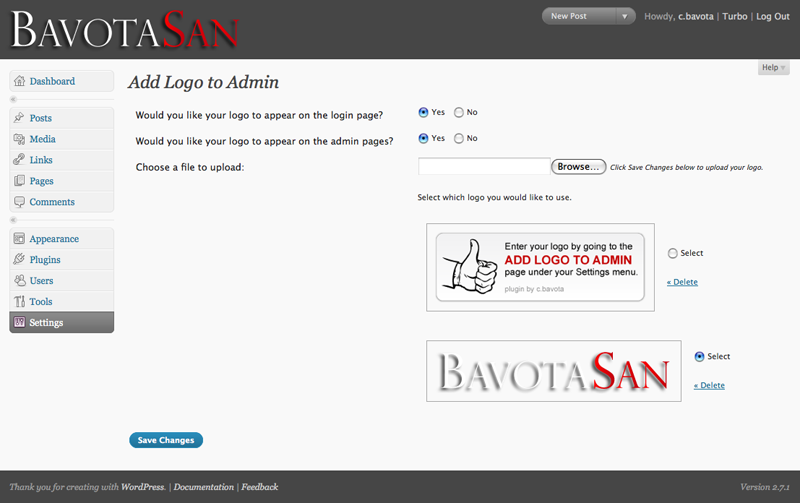
This plugin is build for WordPress 2.7.x. It doesn’t really work for earlier versions.


If you require help or support, please visit the 


And where are the settings in the admin panel to make all this cool stuff happen?
There is actually nothing you need to do to make it work other than activate it. Just upload your logo to the images folder of the plugin and call it logo.png and it will all work automatically.
Uploaded and activated. Doesn’t seem to do anything.
Hey tom,
Which version of WordPress are you using?
Hello,
I am running wp 2.7 and got his error “Fatal error: Cannot redeclare add_logo_to_admin() (previously declared in /home/content/g/l/e/mydirectory/html/attraction/wp-content/plugins/add-logo-to-admin/trunk/add-logo.php:12) in /home/content/g/l/e/gmydirectory/html/attraction/wp-content/plugins/add-logo-to-admin/add-logo.php on line 11″ when I tried to activate this plugin.
Thanks,
Glen
Greetings. I am experiencing the same problem.
I am using a new install of 2.7. I used the plugin install feature in the admin dashboard to install. I uploaded logo.png (74×70, 54,850 bytes) to /public_html/wp-content/plugins/add-logo-to-admin/trunk/images/ , replacing the logo.png file that was there.
Hey Glen and BobG,
This is my first plugin and I obviously messed up with the install to WordPress. I have just updated it to version 1.0.2 to fix all these issues.
Chris,
Sorry for the snarkiness (is that a word?) of the comment I left. I was just short of time and hit ‘submit’ before I looked back at it. I’m running 2.7 and it seems that your recent update fixed the problem. Thanks. It’s little touches like this that make a blog feel personal and it’s programmers like you that make it all possible. Thanks again.
Hey Tom,
No worries. Thanks for letting me know that it wasn’t working properly.
Is there a proportion limit on the graphic? I used one that was taller and not as wide (proportionally) as yours and it stretched it. I made one the same dimensions as yours and it worked fine.
Scratch that – it was a cache thing. The new graphic was displayed but with the old graphic’s proportions. After I cleared the cache, it worked fine.
Sorry for that, but i see my logo only on wp-login page not in admin? I run WP 2.7. On the web test.mysite.com works good but on mysite.com i see logo only on wp-login.php. All browsers same. Cache cleared. Any idea, pls?
Nevermind, its working now, i switch all plugins off, and looks like that Audio player 1.2.3 when active, this not work at admin page, any idea to fix it?
Nevermind again, fixed with new beta of Audio player 2.0b6. Works good, thx!!!
I’ve tested your plugin, and i’ve found a ‘bug’ and it’s solution. When Wordpress it’s not installed on the root of the server, the icon doesn’t shows on login screen, but works fine on admin pages.
To solve it all you need to do is change the value of the imgSrc variable on login.js and remove the “../” from the value, otherwise it will make reference to a non existent image.
Hey eKLIPse,
Thanks for the solution to that issue.
I see in your login.js that you do the following thing:
window.onload = addLogo
This is a very dangerous thing to do, because, in this way, you overwrite all previous actions that already should be done at the onload. It is better to do something like the following:
var onloadOrig=window.onload;if (typeof window.onload != 'function') {
window.onload = function() {
addLogo();
};
} else {
window.onload = function() {
onloadOrig();
addLogo();
};
}
This way, you keep the original functions in the window.onload intact.
Hey Johan,
Thanks for the tip. I have gone in and updated the plugin using a slightly different version of the code you suggested. I also upgraded the plugin a bit by adding an option page in the admin. Take a look for version 1.1 on the WordPress site.
Excellent one. Really worked perfectly.
Never nice. Got it working with a couple of issues.
How can I center the image?
Not working. Does wordpress have to be in the root folder or can it be in a separate wordpress folder?
Using 2.7.1. Is it Compatible?
Hey Jim,
You are correct. It wasn’t working when installed in a subfolder. I have just updated the plugin and now everything should be fine.
I am getting a red x in a blank screen on both the admin pannel and when logged in. Any suggestions as to why this is happening. Is it possible that the image is too big?
Hi,
I used older version of your plugin with success, but, i can’t use this new version with my WordPress 2.7.1.
It’s very strange because my logo appeared on your plugin setting page but never on my admin panel or login panel ???
Updraded to new 1.3 plugin and doesn’t work. WP 2.7.1. It appears upload is not working…
Hey rfolk,
Please make sure that the file you are trying to upload does not have any spaces in it’s name. So if you have “my logo.jpg” it needs to be “my-logo.jpg”.
No spaces. Just logo.png. Then tried logo_admin.png. Same problem.
Where is it trying to write top. Could it be write permissions?
All it’s ok after your mail.
Thanks a lot if you change something.
I am using 2.7.1 and version 1.3.1 of your plugin and it doesn’t seem to work. I choose the file to upload (a jpg with no spaces in the file name), I click “save changes” and the image is blank. The select and delete choices are there but no image although a placeholder for the image does appear. When I refresh the page only the original image you provide with the plugin appears. Any help would be appreciated. Thanks!
Just found out that some people were having issues with the uploader not working due to the fact that the images folder in the plugin was not writeable. Please make sure that
add-logo-to-admin/imagesis writeable.Is it possible to upload a logo for the login page and a different logo for the admin header? I would like to do something similar to the original wordpress where the login logo is bigger (logo + wordpress), and the admin logo is just 32*32 (logo).
Hey tp,
Right now there is no way to have a different logo for the admin and a different logo for the login. I will consider adding that functionality to a future version of the plugin. Thanks.
I installed your plugin and it works, thanks. One problem that I discovered was that the “visit site” link no longer appeared in the header. After doing some research and debugging I discovered that you are replacing the visit site anchor with the newLogo image. I reworked the addLogo function in the admin.js file to replace the img tag rather than overwrite the a tag. Here is the code:
function addLogo() {
var myHead = document.getElementById(“wphead”);
var curLogo = document.getElementById(“wphead”).getElementsByTagName(“img”)[0];
var myLogo = document.createElement(“img”);
var imgSrc = newLogo.site+newLogo.logo;
myLogo.setAttribute(“src”,imgSrc);
myLogo.setAttribute(“id”, “newLogo”);
myHead.replaceChild(myLogo,curLogo);
myBody.style.display = “block”;
return false;
}
I also modified the wp-admin.css file to handle the new image as it needs to be floated left and removed the #wphead h1 a display none style.
Regards,
Chuck
Hey Chuck,
I had originally coded the plugin to work with 2.7 which does not have that img tag in the header. That is why I replaced the “View Site” tag, which also made the logo the link to click back to the site. The above mod will only work in 2.7.1. with the new version of the plugin if you change
var imgSrc = newLogo.site+newLogo.logo;tovar imgSrc = newLogo.logo;.Thanks.
Hi,
I love the plugin, so easy. I have found a bit of a problem, when the plugin is active I get an error when updating theme files.
Footer options would be a great addition to the plugin too.
Thanks for all your work!!
Hey Lori,
I had been encountering this issue as well and didn’t realize it was all my fault. I have gone in and fixed the problem with the plugin. Uploading it right now.
Don’t mean to keep buggin’ ya, but I have another problem with your plugin. I have found that once your plugin is active I can no longer modify user profiles or delete users. I am sure it is your plugin because I tested it by removing it and reinstalling, activating and deactivating, and the problem only occurs when your plugin is active. If you like email me and I will demonstrate.
Hey Jim,
Fixed the issue with the latest version of the plugin. Thanks.
The plugin not display the image, i’m using Wordpress 2.7.1. and your version plugin 1.3.2. not work.
Please check. Thanks for your attention.
Bavota San
This plugin display the image in the Dashboard of Wordpress but not in the Access Area.
Thanks for your information.
Hey Hector,
I would have to take a look at your admin panel or get more information from you in regards to the problem.
Your plugin came just at the right time. I needed to re-brand Wordpress as Strattomedia, my online coaching community.
Unfortunately it is not showing my logo. Any thoughts? My site is in a wordpress (sub) folder right now.
**Correction**
Your plug-in works! User error, plus I didn’t read the above post about making the folder writable.
Thank you for your efforts…it’s a simple fix for a much needed solution.
-Jim
The plug-in works great with Firefox on both the login and admin page, but does not work on the login page with IE 7 (I don’t know about other versions of IE)It does work on the admin page. I am getting the same results on several computers.
I have tried several different image formats and sizes. I get the same results with the default image.
WP 2.7.1
Add Logo to Admin 1.3.2
IE Error:
Line:20
Char:2
Error: ‘newLogo’ is undefined
Code:0
URL:”my website”
Same problem as Josh.
Works great in Firefox.
Does not work in IE7.
Tried two separate .png files. Same results. Can’t see them in IE7, only in Firefox.
No error messages in IE7, just no logo.
I have Wordpress 2.7.1 and Plugin version 1.3.2
Just updated the plugin to version 1.3.3 which addresses the issue with IE7 and the logo not appearing on the login page. It was all because of one little comma. One stupid little comma!
Works great, thank you
my solution, before the upgrade, was borrowed from register plus.
1. I included jQuery by:
<script type = ‘text / javascript’ src = ‘ wp-includes/js/jquery/jquery.js? ver = 1.2.3 ‘>
2nd I made the link of the logo with a link to the home (not wordpress)
jQuery(document).ready( function() {
jQuery(‘#login h1 a’).attr(‘href’, ”);
jQuery(‘#login h1 a’).attr(‘title’, ”);
});
3rd I removed from the css background image and added my
#login h1 a { background:none; background:transparent url() center top no-repeat; padding-bottom:24px }
Ciao
Thanks, c.
You fixed the IE7 issue. Works great! Great plug in!
Great plugin but I would ask for one new feature
It will be very usefull to select one image for login page and different for admin page. Both pages are different (background and size) so I need small white logo on admin and big black logo on login page.
Is it possible to upgrade that plugin?
I’ll work on that for the next upgrade to the plugin.
Hi
I sent you a modified version of this plugin a week or so ago and haven’t heard back. It allows different images as requested in comments 402 and 850 (which I needed too).
LMK if you didn’t get the message and i will send again.
Hey Marc,
I did not receive it. Can you send it again?
Just sent again. Hopefully gets through this time
I tried this and the image I uploaded totally overpowered the top half of the page! What happened?
What was the size of the image?
Very nice template, exactly what i was looking for.
Only one thing i can not get. Is how put my logo banner in my post pages using this template.
Hey there…I successfully installed, but when I upload pics, nothing happens. The only available pic is the default (your logo). Ideas? Thanks!
Be sure your webserver has write permissions to add-logo-to-admin/images directory. Permissions should likely be 755
Hi, great blog. I was wondering, how do I get my logo in the title tag to replace the default blank doc pic?
That is called a favicon. Convert your image to a favicon with any online favicon generator. Then upload the file to your site’s main directory.
Hi…! This rocks. You rock. Thank you for sharing and helping people out. I send you a virtual beer
Thx, very nice plugin.:D
Warning: moveuploadedfile(/home/g2xx/publichtml/blogpage/wp-content/plugins/add-logo-to-admin/images/g2xx-white-trans.gif) [function.move-uploaded-file]: failed to open stream: Permission denied in /home/g2xx/publichtml/blogpage/wp-content/plugins/add-logo-to-admin/add-logo.php on line 36
Warning: moveuploadedfile() [function.move-uploaded-file]: Unable to move ‘/tmp/phpVzeNBq’ to ‘/home/g2xx/publichtml/blogpage/wp-content/plugins/add-logo-to-admin/images/g2xx-white-trans.gif’ in /home/g2xx/publichtml/blogpage/wp-content/plugins/add-logo-to-admin/add-logo.php on line 36
Warning: Cannot modify header information – headers already sent by (output started at /home/g2xx/publichtml/blogpage/wp-content/plugins/add-logo-to-admin/add-logo.php:36) in /home/g2xx/publichtml/blogpage/wp-content/plugins/add-logo-to-admin/add-logo.php on line 59
anybody got any ideas for this newbie. installing my logo produces the above errors.
thanks in advance
Looks like you don’t have the right permissions set for that folder.